





❏ Retain consistent paragraph line spacing formatting in PDF to HTML conversion
- Assigned to
-
 Martin L.
- Notes
-
Hi
Martin
Using UN/0039/58 as my example.
Paragraph 15.
The line spacing looks the same to me throughout the PDF. However, at paragraph 15, the converter tool displays part of the paragraph text as double space. This did not happen with any other paragraphs previous to paragraph 15.
PDF, paragraph 15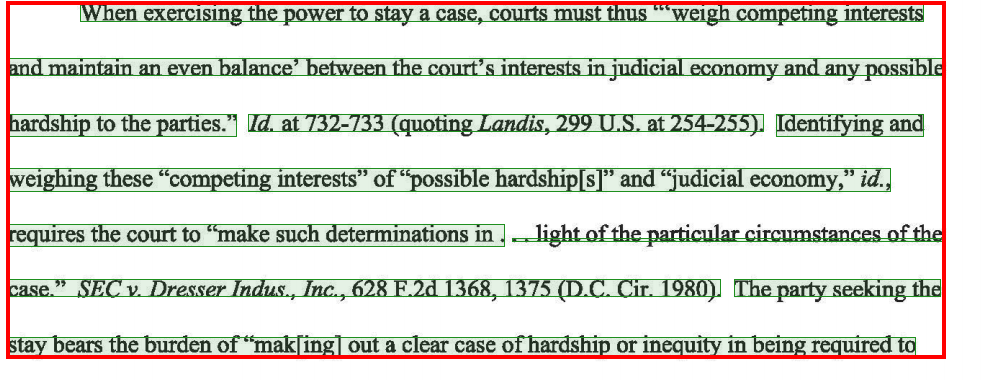
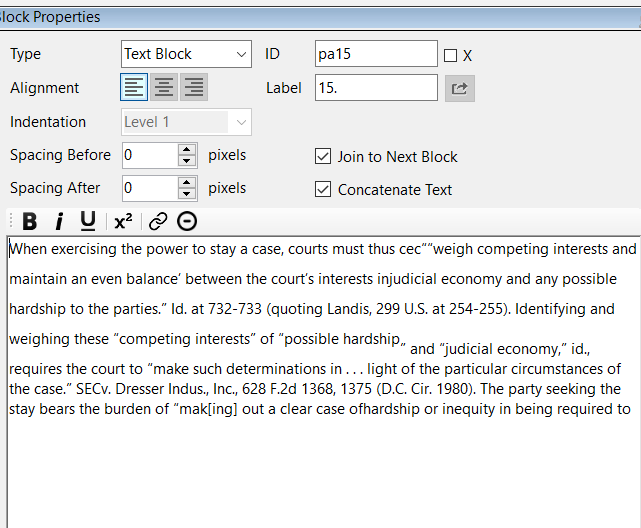
HTML
Is there's a way to fix this issue in the converter tool?
Thanks,
Irit
At first glance, it looks like the first section of text is in Superscript.
Can you try highlighting it, and hitting the "Superscript" button?
-Martin
The same issue occurred at paragraph 28. It's now fixed using your Superscript tip above. But here's how it looked before the fix:
PDF, paragraph 28 (this section continues from previous page)
HTML
I suspect that both this issue and Retaining PDF text formatting in HTML (bold/ italics) - Tologix - Desktop Converter are related.
I will need to troubleshoot the issue with the Bytescout development team.
Thanks,
-Martin