














Add to SN Tree
Hi
 Morgan
In working through the requirements for Adding/Editing the Subject Navigator Tree I need some clarification:
In the following dialogue
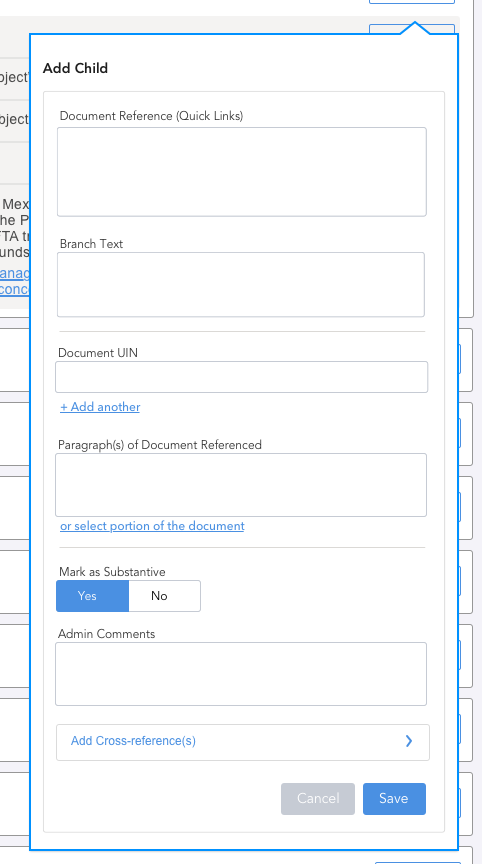
Can you clarify what 'Document Reference (Quick Links)' is pulling from? How does it differ from the document UIN and paragraph reference fields?
Mel
Morgan
In working through the requirements for Adding/Editing the Subject Navigator Tree I need some clarification:
In the following dialogue
Mel
In the current application, Document Reference (Quicklinks) pulls documents from the Category C - Dispute Documents. It is an auto-complete search: https://www.investorstatelawguide.com/MasterTree/Addnode?toc=editNode&rootNodeID=&expandList=1,42324&nodeID=44982&parentID=42324&addLevel=&dataType=2&buttonEdit=Edit%2FRef.&nodeRadio=44982
that displays the full citation of the document: https://www.investorstatelawguide.com/CoreComponents/AddDocumentStep2Case3and4?docId=405
After it is added to the menu, that document will appear in the admin users quicklinks menu until they finish their session (i.e., they will not have to search for the same cases every time they create a new entry).
The admin user can add multiple documents:
When the user selects one of the documents, it adds the applicable UIN and short title to the Document UIN field and Branch Name field:
The new application should function is a similar way, and we will be introducing the quicklinks functionality to the citators as well (pulling different types of documents depending on the tool).
Let me know if you have any questions.
Morgan
Thanks for this!
Mel
Also, to relate this back to the current application and the ISLG Meta Data Field Map: https://docs.google.com/spreadsheets/d/1Ho_yBR8gfCIqivmvkPy_hISkDGozdWsXxn46ImeQ-V4/edit#gid=0, for the Subject Navigator dialogue above, the Document Reference (Quicklinks) field should search and pull entries from Dispute Documents: Full Citation field, and then input the following into the dialogue when one of the documents is selected from the quicklinks menu:
Morgan
Since we have the ability to add multiple documents references with the UIN and paragraph reference fields we need to consider how this will work when used in conjunction with the quick links functionality.
I don't think its technically feasible to use the quick links multiple times to populate different field sets within the same dialogue. Particularly if we are saying they use the same branch text.
Is it fair to say that using quick links will only populate the default fields and if a user adds another document reference they will need to add it manually using the Document UIN field?
Mel
That's a good point. I took a look at how it works in the current application, and it functions the way you have suggested (quicklinks works for the first document, and then the admin user needs to manually input the UIN and short title in the branch name field for the second document). I would be fine keeping it this way, but I wonder if a fairly easy solution would be to create radio button icons next to each Document UIN field, and then the admin user can select which field they want the quicklinks menu to populate.
Morgan
We could explore it but in my opinion its introducing unnecessary complexity both from a technical standpoint and for the user. I would suggest we stick with the current functionality in this case.
Mel
Morgan
Can document references and cross references exist on the same branch of the SN tree?
Mel
I don't think so. The cross references are only inserted on branches where there are no document references.
Thanks,
Morgan
Thanks for the clarification. Upon further reflection I think we should revisit how we add branches to the SN tree.
As I understand it there are 3 type of branches that can be added:
they are presented with the add dialogue. They will then select the type of branch they would like to add corresponding to the list above (doc reference, cross reference, subject/text). Based on the selection the contextual fields will display:
We can have 'Document Reference' selected by default if this is the most common.
This should allow us to simplify the dialogue without burying any actions.
What do you think?
Mel
Morgan