













Design issue in Action Menu Subscriber Side
Hi
 Savannah
 Melissa
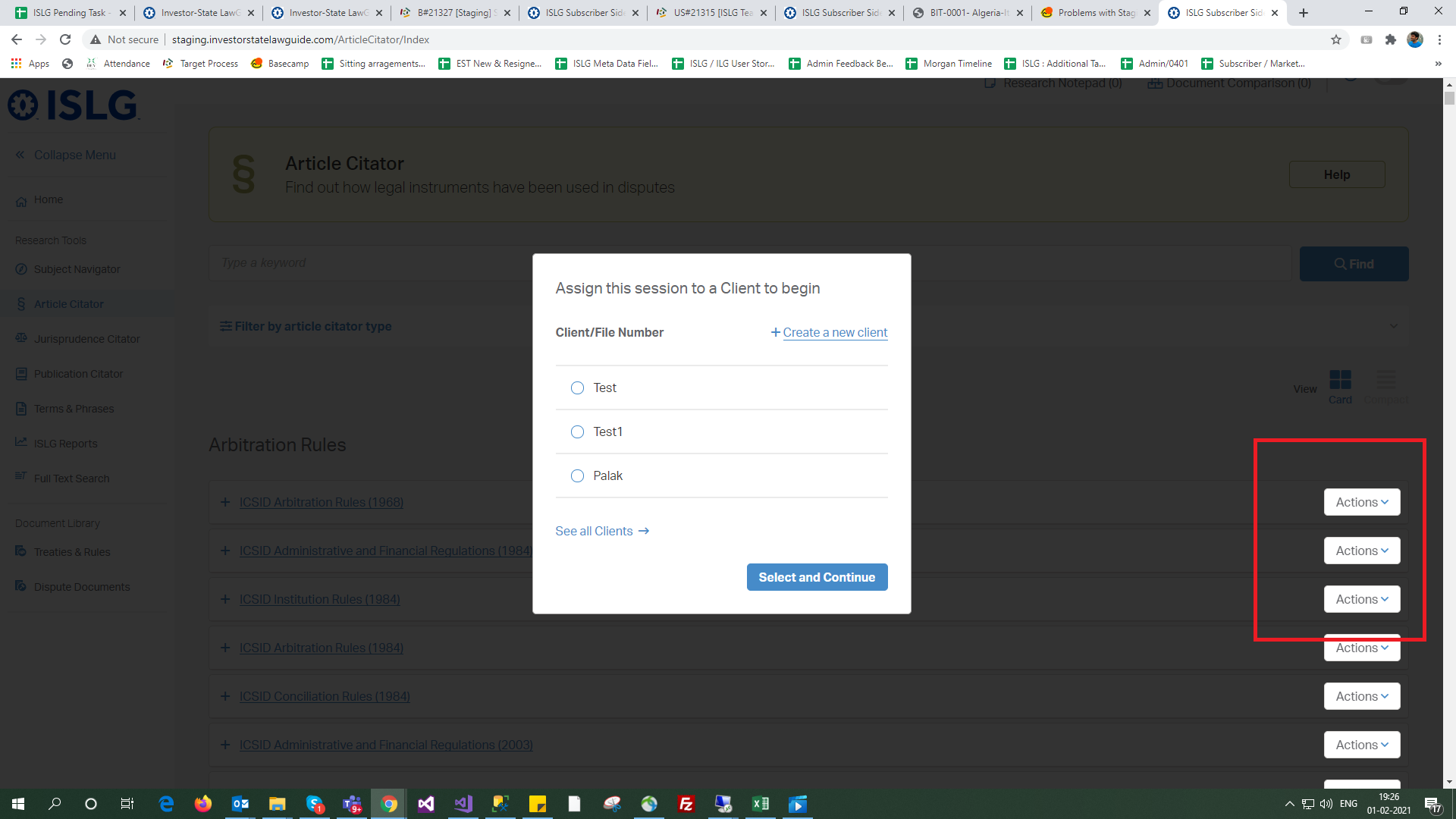
The design issue will come up after migrate the data. As per screen shot, If we display the Action menu at First branch and if any popup will be open then all action menu is highlighted on Subscriber side (Ex. Article Citator, Treaty Rule tool).
This issue is not occurring on rebuild demo because there is less data available . We found that z-indexing is increasing in CSS due to migrated data.
Savannah
Melissa
The design issue will come up after migrate the data. As per screen shot, If we display the Action menu at First branch and if any popup will be open then all action menu is highlighted on Subscriber side (Ex. Article Citator, Treaty Rule tool).
This issue is not occurring on rebuild demo because there is less data available . We found that z-indexing is increasing in CSS due to migrated data.
You will need to update the stylesheet so it matches this (the changes are highlighted in bold):
.popupfixedBackground {
display: none;
position: fixed;
top: 50%;
left: 50%;
-webkit-transform: translate(-50%, -50%);
-moz-transform: translate(-50%, -50%);
-ms-transform: translate(-50%, -50%);
-o-transform: translate(-50%, -50%);
transform: translate(-50%, -50%);
background: white;
border: 1px solid #AEADAC;
-webkit-border-radius: 5px;
-moz-border-radius: 5px;
border-radius: 5px;
z-index: 9999;
height: auto;
width: 500px;
max-width: -webkit-calc(100% - 15px * 2);
max-width: -moz-calc(100% - 15px * 2);
max-width: calc(100% - 15px * 2);
max-height: -webkit-calc(100% - 15px * 2);
max-height: -moz-calc(100% - 15px * 2);
max-height: calc(100% - 15px * 2);
overflow: hidden;
padding-top: 30px;
}
The initial issue is resolved but after first popup close the second popup will be open and that time the same issue occured.
This popup is Session Tracking. It mean once the client name is selected the second popup for matter selection is open and that time the action menu z-index issue is still there.
Savannah
You will need to update these functions on your sassquatch file.
You will have to make sure the modal windows all have a background afterward.
The issue is that sometimes you use another background called .popupfixedBackground but our popup function already adds a background which is called "popup__overlay" at the bottom of HTML when we open a new modal window.
The background was darker because both popupfixedBackground and popup__overlay were used.
prevLocation = prev;
scrollDistance = $(window).scrollTop();
$('body').css("top", scrollDistance * -1);
// FEB 22 - Stephanie
// Will fix the modal issue. Make sure every popup still works afterward.
// $('body').append('<div class="popup__overlay"></div>');
// $('.popup__overlay').fadeIn('fast');
$('body').css("top", "");
// FEB 22 - Stephanie
// Will fix the modal issue. Make sure every popup still works afterward.
// $('.popup__overlay').remove();
$('.popup').hide();
$('.popup.popup__temporary').remove();
$('.popup.open').removeClass('open');
if (prevLocation) {
prevLocation.focus();
prevLocation = null;
}
// Set the window's scroll position back to what it was before the modal was opened
$(window).scrollTop(scrollDistance);
}
// FEB 22 - Stephanie
// Will fix the modal issue. Make sure every popup still works afterward.
// $(document).on('click', '.popup__close, .popup__overlay, .popup__cancel', function () {
$(document).on('click', '.popup__close, .popup__cancel', function () {
handleClosingPopup();
});
Thanks!
Savannah
We need html template with integrated the update JS. We need to check how it looks and how it will work using Action Menu. then after, We will go to integrate this change in application by reference of template.
We need html template then user click on action menu and center popup will be open.