













Draft record - Multiple user access
 Morgan
We have come across and issue in UAT that requires your input.
Within the admin application, we have written criteria outlining that only one user can be editing the details of any master list record at any time. This is particularly significant for Disputes because those fields are shared across multiple dispute document records during editing and analysis.
This has been implemented, however we have encountered an issue around determining when a user is actually accessing a record.
In the current implementation, if a user accesses a draft of a dispute for example, then navigates away without saving, or closes the tab or browser they are still considered an "active" user of that record. This means that all other users attempting to access the record will get the read-only version and are blocked from making any edits.
In discussion with Harsh, this is a heavy technical issue around sessions that is not easily solved. We would like to propose that this issue is tackled after the current development work and for the interim we setup some admin protocols to address the issue:
- Admins must use the Save Draft button or contextual back link when exiting draft master list records
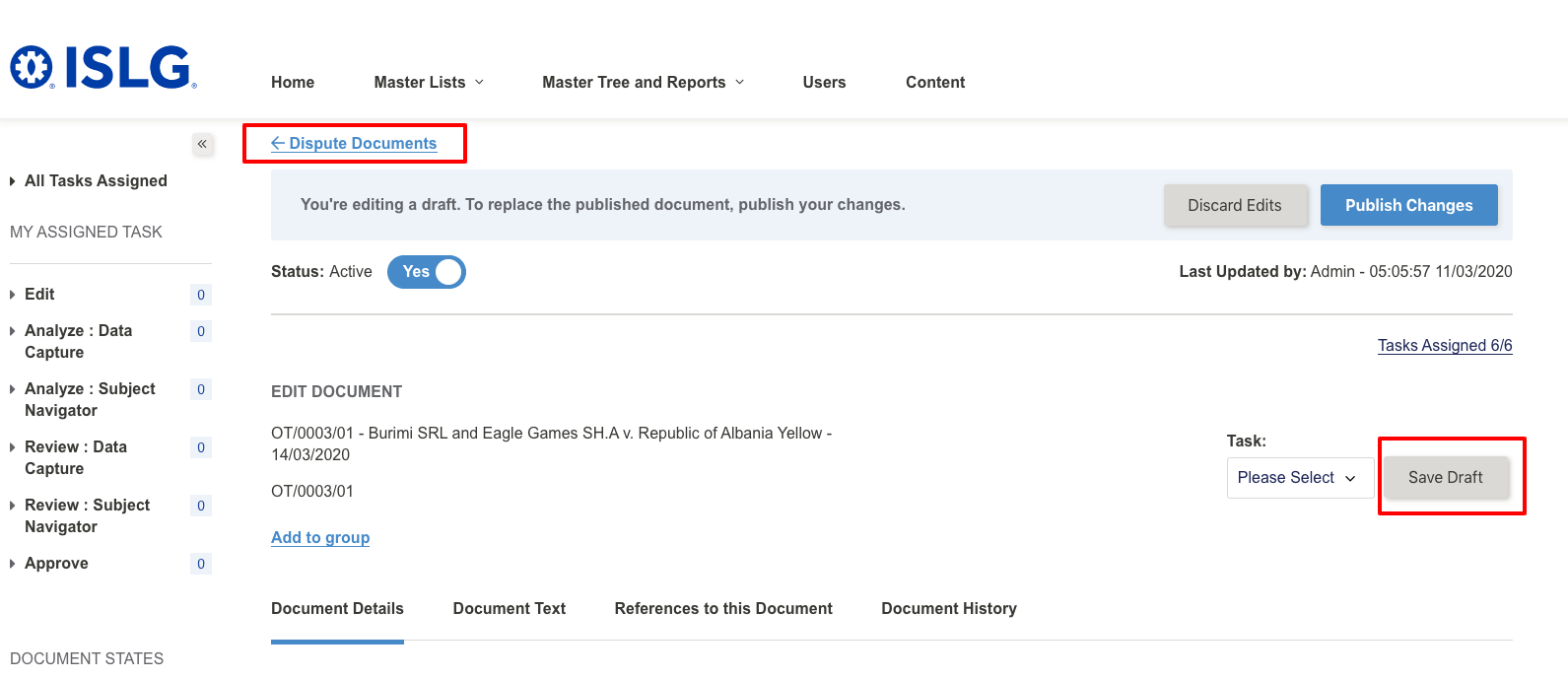
- Admins must log out to end their sessions.
It's my understanding that if admins follow these steps, we can track when a record is actively being edited, thus allowing other users to access records correctly.
 Harsh
Harsh
I'm interested to hear your thoughts. Please let me know if you'd like a call to discuss.
Mel
Mel
1) browser's tab close event
2) browser's window close event
3) Click on anywhere else in application (except save draft, done editing, and contextual back link)
We are closing the user session if admin user will follow the following steps:
1) If user click on save draft or done editing
2) If user click on logout
3) If user click on contextual back link (as per above screenshot).
This is a pretty big issues. Trying to prevent users from closing browsers tabs before ending a session is going to be difficult to control, particularly with our editors and legal analysts.
Morgan
For sure. I’ll set something up for tomorrow. Are you available around 9 or 10 Vancouver time tomorrow?
Mel
Let's do 9:00am. I'll send Zoom details with a calendar invite.
Morgan
Morgan and I were able to discuss this today and came to two decisions.
1. We have agreed that Morgan's team can implement some internal practices in the interim to minimize issues while the DevIT team properly plans to address this issue. That being said, we must make some improvements to the current implementation immediately.
For any record that is view-only because it is being edited by another user we must display a message according to the following criteria:
Only one user can edit the active draft of the record at any given time
Mel
Could you please provide an update on the above, and whether the proposed solution is being implemented.
Thanks,
Morgan
yes, this task has been done and updated card in Target process to UAT.
Thanks,
Ketan Sondarva
Morgan