













✔ Problem with sorting results by passages most frequently cited
Completed by Morgan M.
- Assigned to
-
 Anil V.
 Harsh P.
 Ryan K.
- Due on
- Notes
-
Further to the video below, there is an intermittent problem with the sorting results by passages most frequently cited in the Article Citator. The examples used in the video are the following:
https://www.investorstatelawguide.com/ResearchTools/ArticleCitator?toc=content&id=201&cat=&subcat=&docid=809&AgreementID=110&ProvCode=Art25.(2)&aaprovid=51765&randomno=92&aaNodeID=&sort=mf#ACit
https://www.investorstatelawguide.com/ResearchTools/ArticleCitator?toc=content&id=201&cat=&subcat=&docid=57&AgreementID=73&ProvCode=Art31&aaprovid=40952&randomno=10&aaNodeID=&sort=mf#ACit
These are just two examples, but I suspect there are a number of other examples. When performing the fix, can you please confirm that the issue is resolved across the entire system.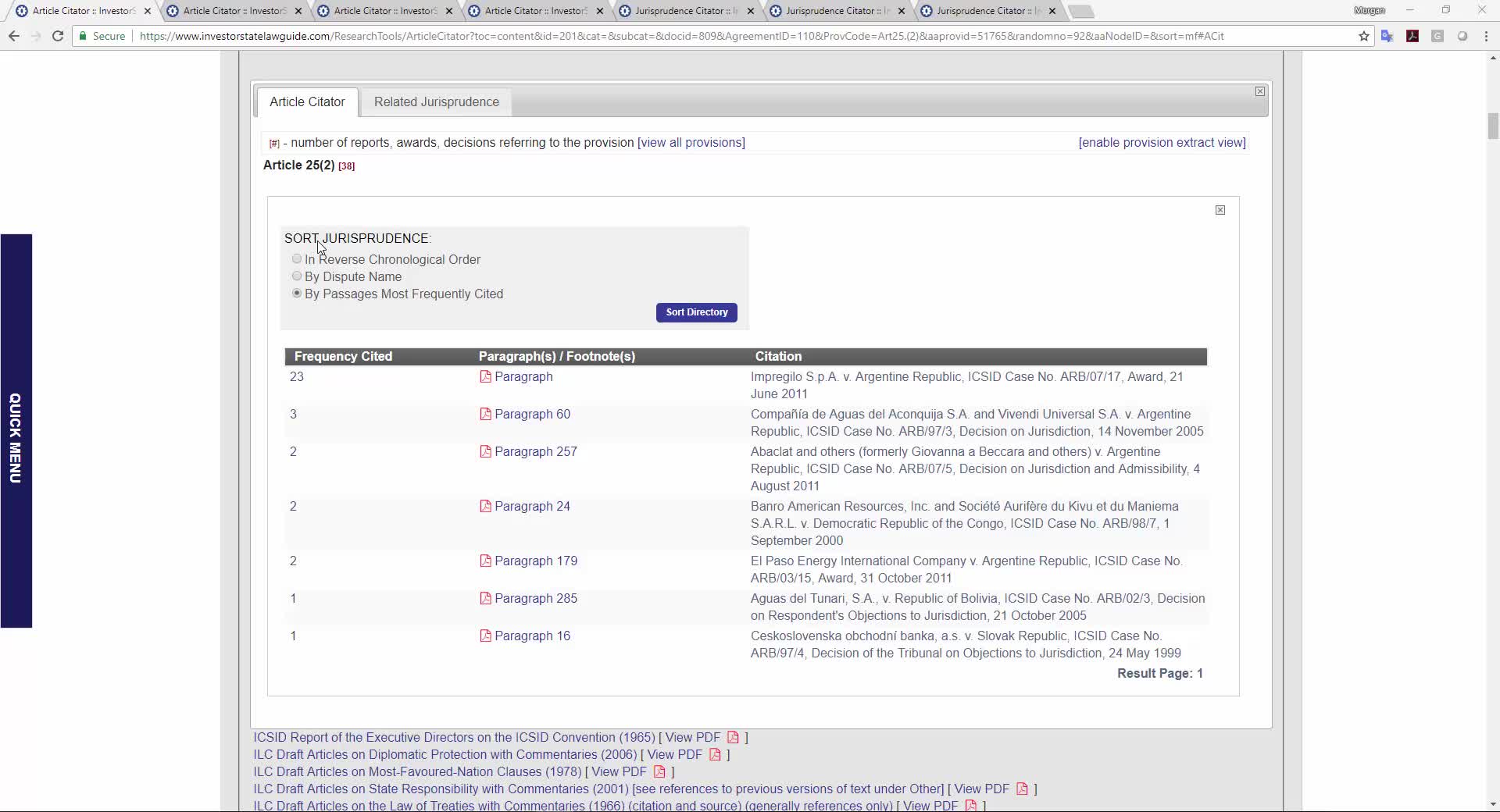
Document with manually inserted short codes and paragraph descriptions: https://www.investorstatelawguide.com/CoreComponents/AddDocumentStep1?docId=1927
Document with Jurisprudence Citator entries referring to short codes for AF/0022/01: https://www.investorstatelawguide.com/CoreComponents/AddDocumentStep3Type4?docId=4793
I have added this comment under this to-do, because resolving this issue will also ensure appropriate cross references can be established between the Article Citator and Jurisprudence Citator to display results by passages most frequently cited under the Article Citator.
Thanks,
Morgan
Has work begun on this to-do? It's been in the queue for a while, and it needs to be addressed. Also, in addition to the issues outlined above, the video below describes another instance where the manual destination codes are not working properly: Related Jurisprudence under the Article Citator. The example used in the video below is here: https://www.investorstatelawguide.com/CoreComponents/AddDocumentStep1?docId=1814 and here: https://www.investorstatelawguide.com/ResearchTools/ArticleCitator?toc=content&id=201&cat=&subcat=&search_title=algeria&catac=Bilateral%20Investment%20Treaties%20(BITs)&docid=58&AgreementID=222&ProvCode=Art1&aaprovid=62671&sort=&aaNodeID=&aaDisputeID=1320545&aa_docid=1814&agreementID=222#aa1814
Thanks,
Morgan
We haven't started the development on this to-do. we will start the work very soon and will keep you updated.
Morgan
We are start working on this task and will update you soon.
Morgan
The above issue has resolved on dev.islg. Please check and let us know the feedback.
When testing Morgan's first issue, I'm now seeing two "Paragraph" links at http://dev.investorstatelawguide.com/ResearchTools/ArticleCitator?toc=content&id=201&cat=&subcat=&
docid=809&AgreementID=110&ProvCode=Art25.(2)&aaprovid=51765&randomno=61&aaNodeID=&agreementID=110&sort=mf#ACit
The manual destination code labelling seems to be working fine now.
Thanks!
Ryan
As
Thanks,
Morgan
We are looking into it and will update you soon.
Morgan
We have resolved the initial requirements of this task on dev.islg. Please check and let us know the feedback.
Morgan
The bookmark issue on the manual destination codes has resolved on dev.islg.
Please check and confirm.
Ryan
Morgan
This task has been migrated on www.islg. Please check and confirm.
Ryan
Thanks,
Morgan
Thanks,
Irit
This task is complete. All applicable JP Citator entries with references to documents that had special destination codes manually entered have been fixed on the Admin site. I double checked them on the Live site as well.
Thanks,
Irit
Further to the video below, this problem above is appearing again in the Article Citator, please get this resolved, and let's ensure we resolve this permanently this time.
Thanks,
Morgan
We are working on this task and will update you soon.
The above issue has resolved on both dev.islg and www.islg. Please check and let us know the feedback.
I've confirmed on both dev.islg and www.islg. Do you know how this issue came up again?
Thanks!
Ryan
There was a minor query issue. we haven't checked null value in query which we have resolved on both dev.islg and www.islg
I confirm that the issue is resolved on both dev.islg and www.islg. However, please confirm how the null value in the query was created. We need to ensure that issue doesn't occur again in the future.
Thanks,
Morgan
Due to some reason the data was inserted null only for particular this document. Hence, Query is considering all data in "All Citation".
Yesterday, we have again checked the whole code but all things are working perfectly.
Thanks for clarifying. However, that sounds somewhat disconcerting. Is there any way for us to run periodic audits on this data to ensure other anomalies do not occur in the future?
Morgan
Just following up on my comment above. I want to ensure we're doing everything possible to prevent this from happening again, because this issue has appeared a number of times over the years.
Thanks,
Morgan
We are looking into this how to prevent or put some checkpoints for this issues. We will update you soon.
Morgan
I'd like to get this to-do wrapped up. Any update on preventing this issue from reappearing again?
Thanks,
Morgan
Further to my comment above, this issue has come up again here: https://www.investorstatelawguide.com/ResearchTools/ArticleCitator?toc=content&id=201&cat=&subcat=&docid=56&AgreementID=79&ProvCode=Art31.4.&aaprovid=46153&randomno=83&aaNodeID=&agreementID=79&sort=mf#ACit.
Also, can you confirm this issue is not present elsewhere in the Article Citator, and how do we prevent this from happening again in the future?
Thanks,
Morgan
There was a minor semi column bug we caught it programming. It means, if we enter semi column after Paragraph No. (E.g 474;) the blank entry entered in database. Temporary We have resolved through database on ww.islg.
But, meantime we are doing change in programming and let you know once it will be completed.
Thanks,
Morgan
The programming change has been done and uploaded on dev.islg. Please check and let us know the feedback.
As an example, In Admin Side now if you will enter citation like "474;" then no blank row will be added in database.
The results on the front-end look good. Could you clarify the blank row issue though. Do we need to modify anything in the way we upload data into the Citators? Or is this resolved through the programming?
Thanks,
Morgan
This issue has resolved through programming. You don't need to modify anything in way of uploading data.
Morgan