














✔ Changing the Document State
Completed by Morgan M.
- Assigned to
-
 Anil V.
 Ryan K.
 Stefanie G.
- Notes
-
Further to the videos below, the current design for modifying the Document State, particular when a document needs to be edited after its published, is very convoluted, and needs more work. The issue include:
- why can't a user view and change the state of the document in the Workflow History View?
- When the document is unpublished, and the admin user assign a task to a user, the Document State should automatically revert back to the state applicable to the the task. For example, if I assign an Edit Document task to a user, the system should automatically change the state to the Edit Document state.
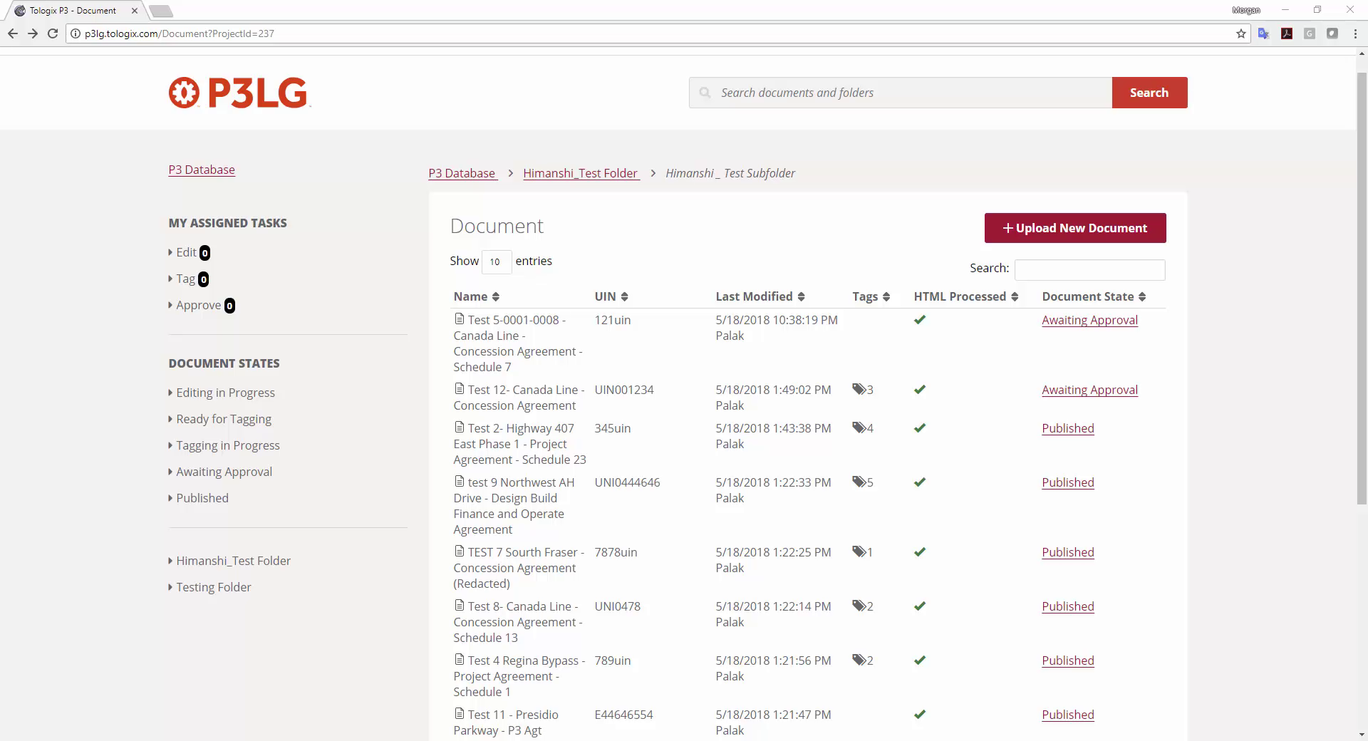
Further to the details above, could you please take a look at the way we've designed the Document Workflow tool and the way it interacts with the Document State. I find it very confusing and difficult to use. We need to modify it so that it's easy to edit published documents, because this will inevitably happen on a regular basis.
Thanks,
Morgan
I can see versioning being useful. We'd probably want to include the ability to view a previous version and restore to that version. Is this what you were thinking as well?
That is odd. I'll perform some more testing, and hopefully the issue has been resolved on my end.
Restoring the previous version would be useful, but the main purpose of the versioning would be to give us the ability to publish a document, but allow the admin user to create a different version to perform edits that could be used to replace the published version after the edits are complete. The idea behind this is that we will commonly need to make edits to published documents, but we don't want to have to unpublish a document while those edits are being performed. Also, by creating a new version it will give us the flexibility of making unpublished edits to document that may take a long time to prepare in the context of tagging. I envision a system that would allow an admin user to create a new version of a published document for editing, and then when they are finished their edits, they will have the ability to select which version will appear as the published version. Make sense?
Morgan
Morgan
As some additional detail on this to-do, below is a video illustrating another problem with the workflow design and how to edit the document state.
Thanks,
Morgan
For 'Tagging in Progress' I found the original user story and the original user flow and it looks like the original intention for this was to be a state for documents that have been assigned but have not yet been tagged. The original intention for 'Ready for Tagging' was to just be purely for assigning the doc for tagging and 'Tagging in Progress' was meant for the actual tagging.
I can see this still being a useful workflow when you have certain admins who assign and other admins who tag. I just think the process of doing this could be made a little easier. Do you agree that we should keep the same workflow (all 5 steps) and we just optimize the way you get from one step to the next/allow users to skip to a later step in the process.
Your descriptions of "Tagging in Progress" and "Ready for Tagging" make sense, so let's maintain all 5 steps. Let's just make it clearer on how to move forward/back through the process. Also, let ensure ensure we clarify how changes in state affect assignments (and vice versa).
Thanks,
Morgan
Wanted to follow-up with one more question. We'll have 2 versions of a published document: published and draft. If the user starts editing a published document we now have a draft verion as well. If the user then hits 'unpublish', I would expect that the only version of document that would exist is now the draft version. I think that we should just provide the user a warning that they'll lose the published version of their document and only have the draft version. This will prevent us from having to do something complex like having 2 unpublished versions of the same document, but I wanted to check in with you to make sure this approach works for your team?
Yes, that makes sense to me. I see there being two primary scenarios:
Thanks,
Morgan
Thanks,
Stef
Morgan
Here are the stories for the changes to the document state/editing process.
Anil, to catch you up...we want to completely untether the tasks from the kinds of quick edits that an admin user would make. We also want to add some versioning into the edit process so that the user can edit a draft of a document while keeping the published version live. The user would then replace the published version with their edited draft. There are a few more components to these changes, but these stories should break it all down for you, but let me know if you have questions:
Document Edit/Tag > Published
(one question: does an approver need to be able to change between edit/tag while reviewing the doc?)
Document Edit/Tag >Unpublished
My Tasks: Edit
My Tasks: Tag
My Tasks: Approve
Assigning Tasks
Preventing Document Conflicts
View Document History
Navigation for User Levels
Morgan, I added a story about what left-side navigation a user should see if they have limited privileges (i.e., tagger, editor, approver). Right now they can see all left-side nav but none of the documents within each of the states/folders. I think we should just show them their specific task. I'm not sure if we were exposing them to the empty document states/folders for a reason. Let me know.
Let me know if there's anything unclear/off in these stories.
Thanks,
Stef
The user stories above look good to me, including the one concerning admin privileges. I'll close this to-do since it deals with the same issue: Problems with permissions for admin users - TOLOGIX - P3 Prototype for Tologix.
I would also prefer the bulk actions, rather than the right-click. We can address this after the other stories are complete, but let's ensure it doesn't get forgotten.
Thanks,
Morgan
Currently team is progressing with these stories. We are targeting to complete this by end of next week. We will keep posting our comments on target process.
Morgan
We have uploaded a beta version for this to do for your review. Please review and let us know whether the flow is fine.
Following stories are in progress:
This is looking really great so far!
I'll comment on target process for changes. Here's all I have so far:
https://industrialagency.tpondemand.com/RestUI/Board.aspx#page=board/4857933491727658105&appConfig=eyJhY2lkIjoiOTk1NDg2NkUwM0I1RTJGMzQ5NjgyOTdFRjk2NkRGN0YifQ==&boardPopup=userstory/4826/silent
(looks like this one is already resolved)
https://industrialagency.tpondemand.com/RestUI/Board.aspx#page=board/4857933491727658105&appConfig=eyJhY2lkIjoiOTk1NDg2NkUwM0I1RTJGMzQ5NjgyOTdFRjk2NkRGN0YifQ==&boardPopup=userstory/4826/silent
I'll keep testing it.
That's probably a good idea. Do you have time today? I have a call with
Morgan
Morgan
Document Edit/Tag > Published
Document Edit/Tag >Unpublished (In progress)
My Tasks: Edit (In progress)
My Tasks: Tag (In progress)
My Tasks: Approve (In progress)
Assigning Tasks
Preventing Document Conflicts
View Document History
Navigation for User Levels
Could you please review the cards that are ready for testing.
Thanks,
Morgan
We have completed all above in progress tasks and uploaded on p3lg. These are still in beta but you can review and give your feedback.
Thanks,
Morgan
Looking for the feedback for this to do.
Ryan
Development is completed for this to do. Please check and let us know your feedback.
I'm testing "Document Edit/Tag > Published" now. The others have been tested and are in done.
Thanks!
Ryan
Thanks,
Morgan
Ryan
When you're back from holidays, could you please take a second look at this on the admin site and determine whether the design requirements for changing the document state are met? The reason I ask is that I noticed when you unpublish a document, the document state changes to "Awaiting Approval", and that there is no way to revert the document state back to any of the previous states (e.g., Tagging in Process, Ready for Tagging, etc). Therefore, if there was a published document that we realized needed significant additional work, there would be no way to send it back to other stages in development. Do you foresee this being a problem? If so, should we build a requirement that allows the admin user to change the document state back to the previous states as necessary, or will this create other problems?
Thanks,
Morgan
Further to the video below, I experienced a weird issue this morning when unpublishing a document from the admin site. Could you investigate and make sure we don't have a larger problem here.
Thanks,
Morgan
We have found and resolved that issue on p3lg. The issue was occurring when we unpublished a draft version. Please check and let us know the feedback.
Regarding awaiting approval status:
When we unpublished any document the status will be changed to "Awaiting Approval", however admin can assign "Edit", "Tagging" or "Review" task to other users from below highlighted screen by editing existing assignee. It would be good if
Ryan
Note that I noticed the document used in this example is stuck in Editing in Progress without the ability to toggle between Editing Document and Tag Document. I hope we're not linking the document state back to task assignments again, because my understanding is that the whole purpose of these changes was to eliminate those requirements.
Thanks,
Morgan
As far as I'm concerned, you should still be able to change the document state by re-assigning tasks or by editing and tagging the document. Unless I'm misunderstanding you, the document states just give super admins a visual of where the document is in the process, this doesn't impact the actual flow of the document in any way. Perhaps I don't understand the problem - are you not able to edit/tag or assign tasks for published and then unpublished documents? You should see it sitting in waiting for approval only until you re-assign tasks or edit/tag yourself.
cc
If you're ok with the current requirements, then so am I. The only thing I assumed would be created would be the ability to manually change a document from one document state to the other without making task assignments. Therefore, although the document state would change as editors complete their assigned tasks, it would still give certain admin users the ability to manually override the document state change and determine what state the document is in regardless of what assignments are completed (with the exception of published, which would require that the document is actually published). This would give us much more flexibility in organizing the data capture process, and allow us to send documents back to previous document states without making task assignments. Currently, I don't see a way of doing this, but perhaps I'm misunderstanding the application.
Could we have a quick call and discuss this?
Thanks,
Morgan
Yes, a call would be good. I'm free tomorrow at 1-2, 3 onwards and I'm free Wednesday all day.
Thanks,
Stef
Morgan
Just talked with Morgan and it does look like something is off here. All documents (regardless of them being published or unpublished) should have the exact same process outlined in our most recent changes.
In this example, it seems stripped of what I should see when editing a document. I should be able to switch between tagging and editing...
Here's the tp story that talks about this:
https://industrialagency.tpondemand.com/RestUI/Board.aspx#page=board/4857933491727658105&appConfig=eyJhY2lkIjoiOTk1NDg2NkUwM0I1RTJGMzQ5NjgyOTdFRjk2NkRGN0YifQ==&boardPopup=userstory/4826/silent
here's the exact wireframe: https://projects.invisionapp.com/share/3XK7FKFR6UM#/screens/301072045
Here's what we're currently seeing:
Morgan has also seen that the documents aren't following the states - so when he's tagging a document, it isn't always moving to tagging in progress.
How was this implemented? From my perspective, the states should show exactly what's being done to a document.
Also, I noted this on target process but I don't know why we've added another category of states. I'm noticing there's one called editing in draft and I don't know why this was added. I think in my wireframes I renamed editing in progress to editing draft, but I never intended for us to add another state. Technically anytime you're editing, it's always a draft.
Let me know if anything is unclear or confusing. Thanks!
We have resolved above issue regarding dropdown to switch between different states. Please check and let us know if any further fine tuning is required.
Regarding document status:
Document status will only move from lower to higher. It cannot move from higher to lower (e.g. Awaiting approval to Tagging in process).
If there is one document with "Editing in Progress" status and user will first complete tagging then the status will be "Awaiting Approval" though editing is pending.
After completing tagging another user will complete editing then the document status will remain to "Awaiting Approval" as its tagging is already done.
Please let us know your comments on this.
Regarding Editing Draft:
Editing draft is not a status but it is a link to view all draft version documents regardless of its status. Please suggest.
The change is looking ok so far. We still don't have the 'Done Editing' button from the wire but I can understand why if the document state isn;t following where the document actually is. I guess what I don't understand is the relationship between document and state. To me, the state should always shift with where the document currently is, regardless of if it's a backwards or forwards process...I think this is a little confusing. Also, I don't think we'd need the added state of editing draft because any document being edited is a draft.
I understand the logic behind having "Editing in Draft". It may be useful to identify which published documents have a draft version open. However, perhaps this should be displayed in the list of published documents, rather than its own document state. For example, if a draft is created for a published document, perhaps the document state could display "Published - Draft" under Document State:
"Published" and "Published - Draft" would both fall under Published documents on the left side-bar, but the admin user would be able to see which published documents have open drafts.
At the same time, if the document becomes unpublished, the document state would change to "Awaiting Approval", and then the document state would change to "Editing in Progress", "Ready for Tagging", "Tagging in Progress", etc., as the edits are made to the document. The document would come back to the "Awaiting Approval" when the editing and tagging is complete.
Make sense?
Morgan
Thanks for the feedback. Our understanding is as follows:
Document state:
Example 1:
Let say one document is assigned to user1 for editing, user2 for tagging and user3 for review. The document's current status is "Editing in Progress".
A draft version is created for one published document so that status of the document will be "Editing in Progress" and assigned to user1 for editing, user2 for tagging and user3 for review.
Admin unpublished a published document so that status will be "Awaiting Approval". Now this is assigned to user1 for editing and user2 for review. Let's assume that no further tagging is required.
will perform any action regardless of task assignment.
Please let us know if we understood this correctly.
Need clarification:
Please let us know whether Reviewer can do any change and save anything during review before publishing the document.
----------------------------------------------------------------------------------------------------------
Regarding Editing Draft:
As
Question:
Need clarification:
Please let us know whether Reviewer can do any change and save anything during review before publishing the document. - yes the reviewer can do all of these actions.
I'm unclear on your other question to Morgan.
I believe the examples look good.
Regarding your question on "Published - Draft", only one version of the documents needs to be displayed. All you're doing is displaying whether the published document has an ongoing draft, but there is no need to display a separate "Published" version.
Thanks,
Morgan
We are working on this. This will be completed by Monday.
Morgan
We have done and uploaded above changes on p3lg. Please check and let us know if anything.
Hope you had a good holiday. It's looking good so far!
I noticed that we're still missing 'done editing' 'done tagging' actions when the document hasn't been assigned which prevents the documents from ending up in 'waiting for approval'.
We're also missing the message on unpublished documents beside the publish button - https://projects.invisionapp.com/share/3XK7FKFR6UM#/screens/301072045
Also on the left side-bar it should say Editing Draft, not Editing in Draft.
Thanks! Yes, we had a good holiday.
We have done above changes for Admin and Approver both. Please review and let us know if anything.
Unrelated: When I delete a document from the database, I can't re-upload it if it has the same name as the deleted one.
When I open a document from the state 'ready for tagging', I think the default view be the tagging view.
When I create a draft of a published document, the draft still is stuck in the 'published state'. It doesn't appear in editing draft or ready for tagging...it seems stuck in published now.
When I create a draft, initially the document looks correct, however, if i close and reopen it, I see this:
We're still just missing the message in the banner of unpublished documents (You're editing a draft that isn't published.) https://projects.invisionapp.com/share/3XK7FKFR6UM#/screens/301072045
Let me know if anything is confusing.
Unrelated: When I delete a document from the database, I can't re-upload it if it has the same name as the deleted one. - Done
When I open a document from the state 'ready for tagging', I think the default view be the tagging view. - Done
When I create a draft of a published document, the draft still is stuck in the 'published state'. It doesn't appear in editing draft or ready for tagging...it seems stuck in published now. - We are unable to produce this. Can you please recheck and provide us steps? Please note that whenever user will create a draft of published version, it will be shown as "Published-draft" in the list.
When I create a draft, initially the document looks correct, however, if i close and reopen it, I see this: We are unable to produce this. Please provide us the steps.
We're still just missing the message in the banner of unpublished documents (You're editing a draft that isn't published.) https://projects.invisionapp.com/share/3XK7FKFR6UM#/screens/301072045
- When we unpublish any document, we think there is no need to display this message as unpublished document is not a draft version.
Please review all above and let us know your feedback.
I'm pretty tied up with other matters today. Could you confirm that the requirements on this to-do are complete, and then I'll perform some final testing before completing the to-do on Monday.
Thanks,
Morgan
Documents that have been previously published are still trapped in the 'published' state. See video:
I still do see this weird state where you can't save. It's happening randomly. See video:
Any unpublished document is a draft (regardless of it being previously published or not), so I'm not convinced for why you'd omit the message.
We have resolved and uploaded above issues on p3lg. Please check and feedback.
It's starting to look good. However, I discovered a couple of issues that need to be addressed:
I'll watch your video a little later today.
Morgan
We are working on your above feedback and will be completed by tomorrow for your review.
We did changes and uploaded on p3lg to achieve above things explained by
The other thing you'll see in the video is that the dropdown isn't always labelled consistently. Sometimes it's 'Awaiting Approval' and sometimes it's Approve/Publish Document, but
I take your point. We can keep the labels the same for the time being. However, let's ensure we fix the bug you've pointed out above.
Thanks,
Morgan
Above issue regarding awaiting approval is resolved on p3lg. Please check and feedback.
It's looking really good to me. Assuming no one has any other issues to report, I think I'm ready to mark this to-do complete.
Morgan