












✔ Create flexible tree structure for Tag Directory
Completed by Morgan M.
- Assigned to
-
 Anil V.
 Hiren P.
 Melissa C.
 Ryan K.
 Stefanie G.
- Notes
-
User Stories for this Feature:
Add a group
Add Tags
Add Sub-Groups
Re-Position Sub-Groups, Groups and Tags
Front-end
----
Further to the video below, we need to revisit the design of the tag directory, and the current restrictions we've imposed on preventing subject matter experts from creating a more elaborate tree structuring for organizing tags. Given that users are given the ability to browse by tags on the front-end, when the product starts to build out thousands of different tags, a front-end user is going to have a very difficult time managing things unless they are organized in a more structured tree. I know this has the potential of creating a very elaborate and confusing tree (which is something we're dealing with in the ISLG Subject Navigator), but we should address this issue at the content editorial level, not the application level.
Thanks,
Morgan
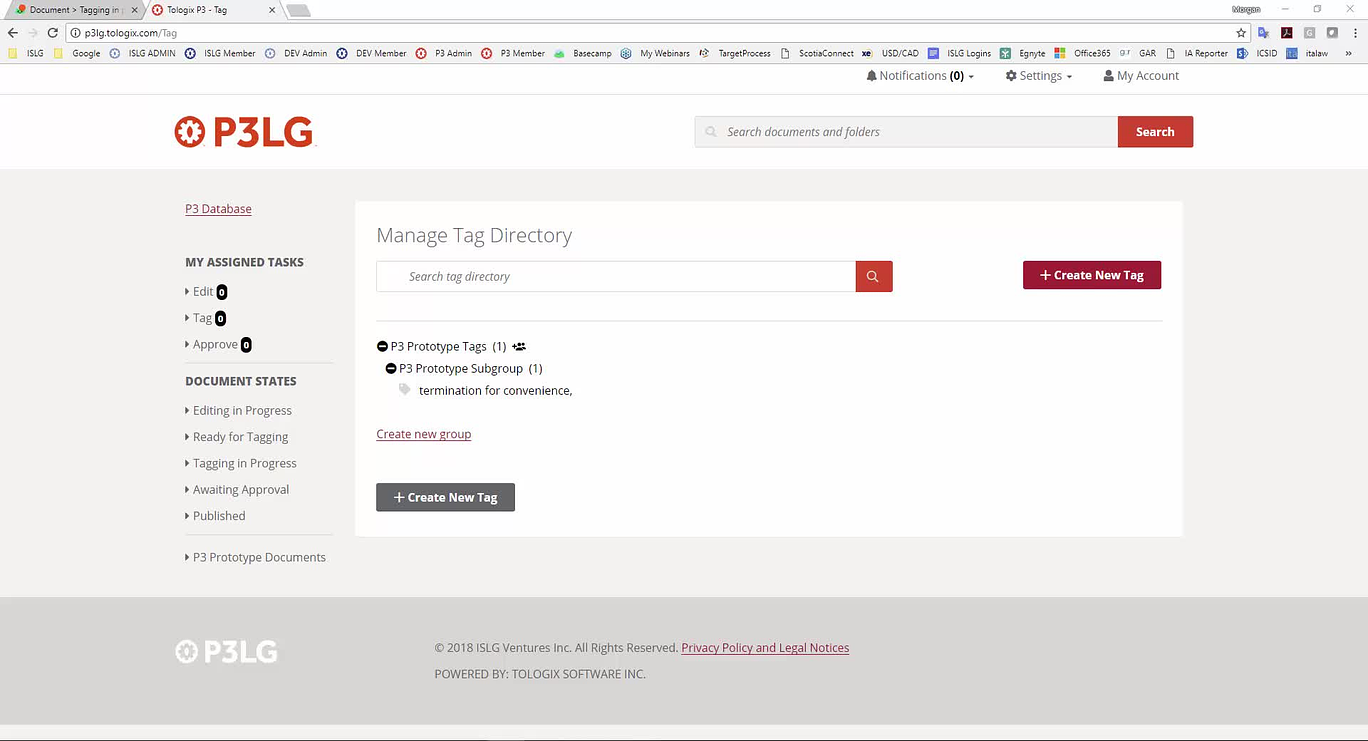
Mel and I are prioritizing these larger P3 design changes for early next week.
No, it doesn't have to be as elaborate as the Subject Navigator with cross-references, etc. (we have synonyms for this anyways). The main thing is to give the subject matter experts the ability to categorize tags into groups (and subgroups) without restrictions.
Thanks and I appreciate giving this a higher priority. As I told
Thanks,
Morgan
If there isn't flexibility in changing this, Morgan has suggested that perhaps we do not display this top level group to the front-end user and only display sub-groups. If we do it this way, I'd assume we only want one group on the admin side.
It would be super ideal to just make the groups level more flexible. Let me know what you think!
We faced some issues while putting tag in super group, we will figure this out and find a way to put tag in super group as well.
Here are my initial stories for this improvement. We made some small changes to improve the visual design, in particular to the front-end.
You can see here:
Here are the stories:
Add a group
Add Tags
Add Sub-Groups
Re-Position Sub-Groups, Groups and Tags
Front-end
I tried to keep this short and only outline what's changing about what has been initially developed.
Thanks!
Stef
This looks good to me. I suppose I'm ok with limiting our ability to collapse a group within another group; however, is there a reason for limiting this? I understand if there is technical limitations that prevents us from doing this, but assuming
Morgan
We have reviewed all 5 stories and seems OK. Can
Yes, please go ahead with the HTML design.
Thanks,
Morgan
Assuming with this that we'll use the drag n drop that you've already implemented.
I also moved the user story links for this to the description of this story so please do let me know if you have questions.
We will accommodate this design in our existing tree structure for tag directory. We will let you know in case of any query.
Do you have an update on this task?
Thanks!
Ryan
This task is in progress. This is a big change so it will take some time. We will let you know once it will be ready for your review.
Understood. Could you give us estimate of how long it will take?
Thanks,
Morgan
This requires around 2 weeks of development.
We have a question regarding ordering of the groups/sub-groups and tags:
1. Is it fine if we display all the sub-groups first and display all the tags later? User can re-order all the sub-groups or tags using drag and drop but the groups will be re-ordered and displayed first and after that all tags will be re-ordered and displayed.
E.g. There are 3 sub-groups sg1, sg2, sg3 and 3 tags t1,t2,t3 inside a super group g1. So the sequence inside the g1 will be:
Sg1
Sg2
Sg3
t1
t2
t3
If user will drag t2 between sg1 and sg2 then the new sequence will be:
Sg1
Sg2
Sg3
t2
t1
t3
Similarly, if user will drag sg1 between t2 and t3 then the new sequence will be:
Sg2
Sg3
Sg1
t1
t2
t3
The above subgroups will again have tags/sub-groups too. This will be up to nth level. But here my question is only regarding ordering of sub-groups and tags at a particular level.
If so, I don't see anything wrong with that - from a front end user perspective it would be good to organize the tags in a group together and the sub-groups together. That's as long as when we drag a tag into a subgroup, it becomes part of that subgroup.
Yes, we can change order of sub-groups and tags, the only thing is to keep all sub-groups and tags together at a particular level in tree.
Using
Thanks,
Morgan
I think what anil is describing is not dragging a tag into a category but under it and the hierarchy placed...so basically when we have sub-groups and tags all at the same level, we'd group the tags together and the sub-groups together.
I think to add a tag into a sub-group, you'd still drag that tag into the subgroup - otherwise you're just changing the order of elements.
Ok. I think I understand. However, I think we should reverse the ordering then so that tags appear above the sub-groups at the same level. Therefore, using the same example above:
Thanks,
Morgan
We will make tags first and sub-groups after at any hierarchy level.
We have uploaded a beta version of new tag structure on p3lg. Please check and let us know the feedback. Please take a note that we are still testing this.
The new tag directory looks great. However, further to the videos below, I discovered a few problems including an error where the entire director was deleted when I attempted to create a tag with an association with multiple groups.
Thanks,
Morgan
Erased tag directory when creating new tab - Now data are coming but we couldn't able to find root cause of this issue. Can you please try to reproduce this issue and provide us steps?
Change when three dots appear - In progress
Drag-drop problems for tag directory - When a group is closed and user will try to drag and drop any item in this, the horizontal line will not come but vertical line will come which indicates that user can move the selected item in that closed group as a children, which will come at first position in that closed group. When a group is opened, the horizontal line will come as it indicates the position where you want to drop(move) the item. Please suggest.
We require to put 3 dots style in the tree from top to bottom as describe by Morgan in "Change when three dots appear (4-Jul-18).mp4" video. We are looking into this. Can you please look and guide us?
I followed the same steps I did yesterday that resulted in erasing the tag directory, but it seems to be working fine today. So I'm not sure how to recreate the issues. I suppose we'll leave it for the time being, and keep an eye out for it going forward.
Understood. I'm fine with this as long as
Also,
Thanks,
Morgan
For the icon - yes this makes sense to me.
The other thing I'll add which I think got missed above is that we shouldn't be showing the drag indicator (3 dots) on the front-end. These should only appear on the backend.
Thanks,
Morgan
We require to put 3 dots style in the tree from top to bottom as describe by Morgan in "Change when three dots appear (4-Jul-18).mp4" video. We are looking into this. Can you please look and guide us?
In the above screenshot there is styling that triggers the display of the 3 dots on hover. To prevent parent items from displaying the 3 dots when a child is hovered replace "li:hover > .jqtree-element" in the above CSS declaration with "li > .jqtree-element:hover".
.nav--tags .jqtree_common li > .jqtree-element:hover > .fa-ellipsis-v{
  display:block;
}
In order to display the three dots from top to bottom a Javascript solution will have to be in place.
In JQuery:
$('.jqtree-element').mouseenter(function(){
	$(this).closest('li').addClass('hovered');
});

$('.jqtree-element').mouseleave(function(){
	$(this).closest('li').removeClass('hovered');
});
And a new CSS declaration will need to be added:
.jqtree_common li.hovered .fa-ellipsis-v{ display:block; }We will put this new style in our code and will let you know if anything.
We have implemented this in our local environment and it works perfectly fine.
We have implemented 3 dots top to bottom. Please check and confirm.
This may be because I was just uploading a new version on p3lg. Can you please check again and confirm?
We have resolved this. Can you check above issue with ctrl+f5 and feedback?
Everything looks good to me. I'll mark this to-do complete.
Thanks,
Morgan