












✔ Change requirements for Expiry Date for accounts in groups
Completed by Morgan M.
- Assigned to
-
 Harsh P.
 Naomi J.
- Notes
-
For the the Expiry Dates for individual user accounts, after discussions with
 Liam
Liam
 Marysia
- When a user account gets assigned to a group:
- any date entered into the Expiry Date field is deleted, and
- the admin user cannot edit the field while the user account is assigned to a group.
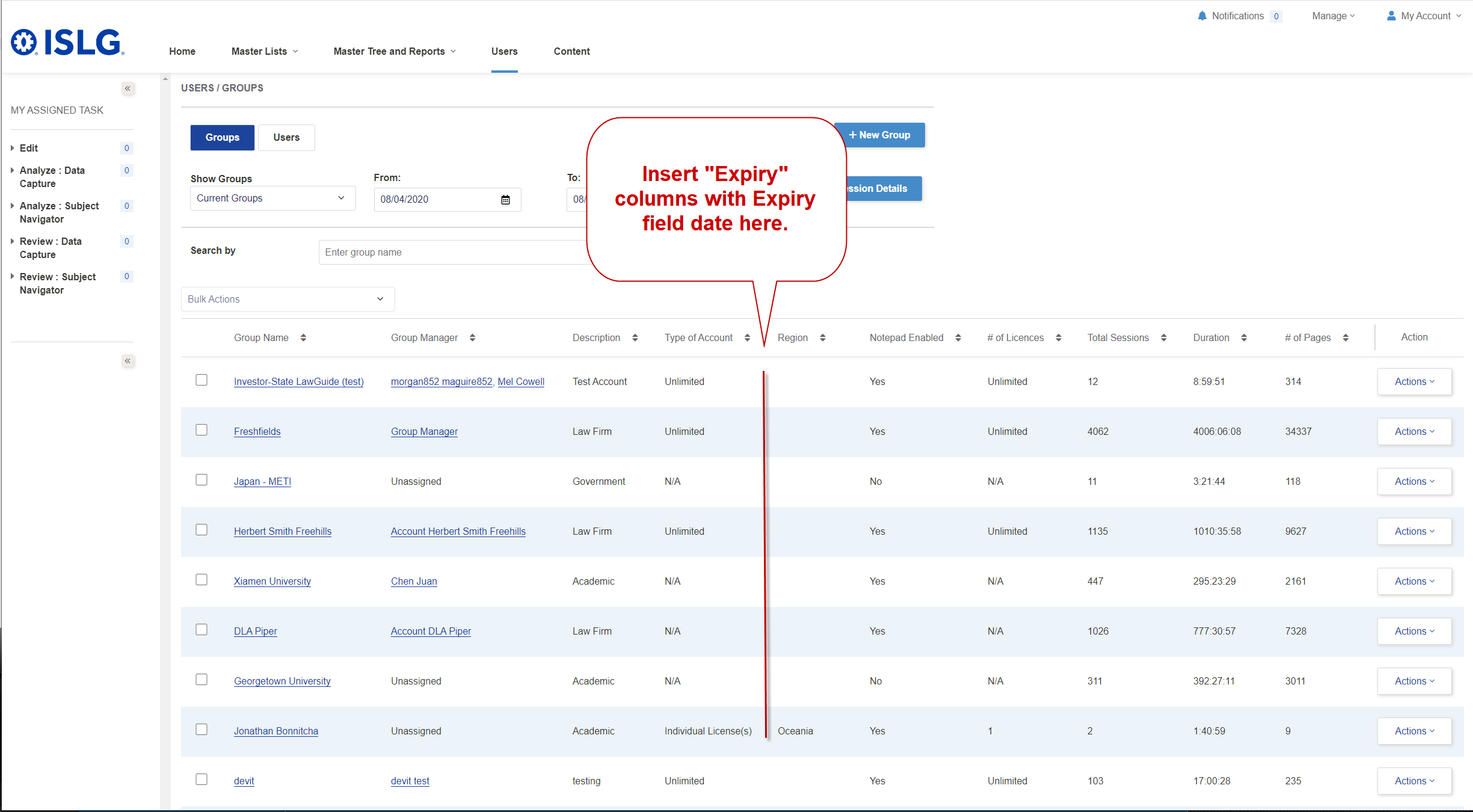
- In addition, the Group Management table currently excludes a column listing the expiry date, we'll want to modify the table an insert a "Expiry" columns between "Type of Account" and "Region":
- When a user account gets assigned to a group:
That was my mistake, today I have checked and found that we have set status "Non-Active" when expiry date passed.
The Service is running every night 11:45 PM server time to update the Subscriber and Group status if they passed expiry date.
Today, I have removed that service on app.islg so now if the expiry date is reached then status will be not changed on app.islg.
Hope this is fine.
We'd rather have the accounts change to non-active status when the expiry date is reached, so please change it back. Let's ensure it matches the requirements as written in the applicable user stories (at both the user and group level). Also, please confirm my second question about the timing.
Thanks,
Morgan
The timing is 11:45 PM Server time every day. It means every day the service is running and fetch the subscriber who passed expiry date.
Can we get back change ? If I get back change then service will run tonight 11:45 PM and all the expiry date groups and subscribers will become
non-active.
Please confirm.
Thanks,
Morgan
I have modified the notes above to clarify that this to-do will now focus only modifying the requirements concerning the Expiry Date for user accounts vis-a-vis groups.
Morgan
Here is an update on the group expiration requirements based on a call with Harsh & Team this morning:
Please let Harsh know if you would like this job to be started again. Based on his review 500+ subscribers will be moved to not-active when he does this.
Naomi and I will confirm the original requirements that were not able to be included for launch and Harsh will investigate how to ensure:
Also note, as mentioned on the related Target Process card, in the current implementation, subscriber expiration is already being inherited from the group and is displayed as read-only for group subscribers. If a user is removed from a group, the group expiry date will be removed and then can be managed for the subscriber separately.
The only instance when an individual group subscriber's expiry date can be managed independently is when there is no expiry date set for the group. Would you like us to remove this functionality?
Let me know if you'd like to discuss further.
Mel
Yes, I'm aware of the above, but I'd like these requirements changed as explained through my other posts. We don't want want the group expiry date to affect the "status" of the individual user accounts, we only want it to block access when the group account status changes to non-active. As explained in my other posts, the system is currently doing this, we just need to remove the data from expiry date field when the user account is part of a group. This will ensure the user account status is not affected when the group status changes while the group status controls access.
Could you please update the relevant card in Target Process and we'll get this implemented according to the to-do priority list.
Re the SQL job, we'll keep that inactive until we clean up and remove the data from the expiry date field from all the user accounts included in a group and have updated the group expiry date field. We'll need to do this through a back process where we'll provide
Thanks,
Morgan
BTW, regarding the 6am, Monday development call. Could you please ensure
Thanks,
Morgan
I have made minor updates to the criteria previously written to accommodate this:
https://industrialagency.tpondemand.com/entity/23284-islg-team-feedback-updates-to-group
https://industrialagency.tpondemand.com/entity/23317-islg-team-feedback-group-user-expiry
Mel
Please implement the user stories above according the the priorities of this to-do. Note that the only effective change to the current requirements is:
Please implement on staging.islg, and then after testing we'll get this integrated into app.islg.
Thanks,
Morgan
Today, We have deployed new version on both app.islg and staging.islg. so this task has been deployed on both app.islg and staging.islg.
Now, Subscriber will be not able to login/auto-login, if expiry date is passed. Could you please check and let us know the feedback.
I have also moved both stories in UAT.
It concerns me a little that we deployed the change directly on app.islg without fully testing this change on staging first, but I'll setup some tests today to make sure this is working correctly.
Thanks,
Morgan
Due to Document Comparison task, We need to also publish this task on app.islg because today we need to deploy new version.
Due to this reason, We have published this task directly on app.islg.
Our QC is checked fully. But, you can also test and check and if there is any issue then will resolve quickly.
I've set my test group's expiry for tomorrow so I will verify both user stories completely by then. I did notice however that in the group > edit page, there is a message that states "Status of all group's users will change to Non-Active upon reaching expiry date." which is not according to the criteria. I will verify if this is how it is working by tomorrow.
The story regarding users inheriting the group's expiry (https://industrialagency.tpondemand.com/entity/23317-islg-team-feedback-group-user-expiry) does seem to be working properly, however.
Thanks,
Naomi
"Status of all group's users will change to Non-Active upon reaching expiry date." This is just old message which we removed now on both app.islg and staging.islg.
Please check again.
I've setup my own test as well. I also noticed that user accounts assigned to groups still have their expiry dates. My understanding was that these would be eliminated when the user is assigned to a group, but I'll let this get addressed as part of UAT.
Also,
Thanks,
Morgan
Testing the expired accounts story this morning, both auto-IP access and login was blocked for me which was good. However the following issues seem to be occurring with the criteria:
Could you provide details on what accounts you used for testing purposes along with screenshots, because my tests produced conflicting results from above.
Thanks,
Morgan
Following-up on above, further to the video below, the only outstanding issues I've found on staging.islg is that the status of the group is not changing to Non-Active when the expiration date is reached. Otherwise, everything is working accordingly to the requirements. Could you please clarify if your getting conflicting results.
Thanks,
Morgan
Please see screenshots/videos for the issues I mentioned above. As well I tested this on staging with Industrial Agency test as the group and my user that is the only member of the group which is "Naomi Test":
Could we please resolve this on staging.islg and then assuming everything is resolved, we'll deploy the changes to app.islg during the next deployment window at on Monday at 11:30pm EST (Tuesday at 9am IST).
Thanks,
Morgan
Further to the video below, I found another issue with individual user accounts that are not assigned to a group. According to the requirements, if a individual user account is not assigned to a group and date in the Expiry Date is reached, it should change the status of the account to Non-Active. That is not occurring currently, the status on the account is not changing when the Expiry Date is reach. A message is displayed indicating the "User expiration date has been reached", but it's unclear if this is blocking access to the platform.
Thanks,
Morgan
We are working on the above issues and it will be completed by tomorrow on staging.islg. so will deploy this task on app.islg by 11th May.
The above all issues have been done on staging.islg. You can check by adding new group and user.
Please check and confirm.
I'll setup some tests on staging and let you know the results. However, I'm going to perform the tests on existing accounts, because we need to ensure this work on existing accounts.
Thanks,
Morgan
I just checked my test and the following issue is still unresolved:
Thanks,
Morgan
We found bug while JOB is running at 11:45 PM on Staging database to make group Non-Active. We resolved it and we put one more group for testing purpose.
We will let you know by tomorrow once our test will be done on staging.islg.
Confirming that my tests concluded the same as you, the outstanding issue I see is the status of the expired group not changing.
Thanks,
Naomi
Looks like the bug isn't resolved. Further to the screenshot below, the group I have setup for testing purposes (Investor-State LawGuide (Seasons))
didn't change to "Non-Active" status at 11:45pm EST.
Thanks,
Morgan
Following-up on above, it appears that was just a delay in the SQL job from executing and changing the status of my test account, the status of the account has changed to "Non-Active":
However, I've found two other issues that need to be examined:
Thanks,
Morgan
The above all issues have been resolved on staging.islg. Please check and confirm.
For #2nd issue in above comment, Please Provide feedback.
I do agree this would be a more consistent approach, my only concern would be that the user's status prior to the expiry date would get lost. If it's possible that changing the expiration date of the user can restore the user status this would be the best approach. However, these were the original requirements and I know there were some technical issues in implementing this.
Please let me know your thoughts here if you think that would create an issue for your team.
Thanks,
Naomi
After talking through the issue with
I believe all the requirements for this to-do are now resolved on staging.islg and I'll mark the to-do complete.
Thanks,
Morgan
Note that the changes above are now deployed on app.islg. Please note that the following group have expired or will be expiring this week and that action will need to be taken to ensure access is not blocked when the expiration date is reached.
Thanks,
Morgan
As a final step to complete this to-do, we need to delete existing data within the Expiry Date field for all user accounts that are currently assigned to a group. Could you please proceed with deleting such data from staging.islg. Once we confirm this was performed successfully on staging.islg, we will do the same on app.islg.
Further to the screenshot below, this will apply to accounts that are assigned to a group and because the expiry date was assigned before we implemented the changes above, the date still appears in the details for the user account:
Thanks,
Morgan
We have removed Expiry Date form users who are associated with group on staging.islg. Please check and verify.
If it will be OK then will do same for app.islg.
Everything looks good. Please proceed with making the same on app.islg.
Thanks,
Morgan
We did this change on app.islg through query. so the expiry date is blank for the users who are associated with group on app.islg.
Please check and confrim.
Everything looks good.
Marking the to-do complete.
Morgan