TOLOGIX - ISLG App Rebuild

Create columns filters within ISLG Reports

Assigned to
Harsh Parikh, Tech Lead at DevIT Harsh P.
Notes
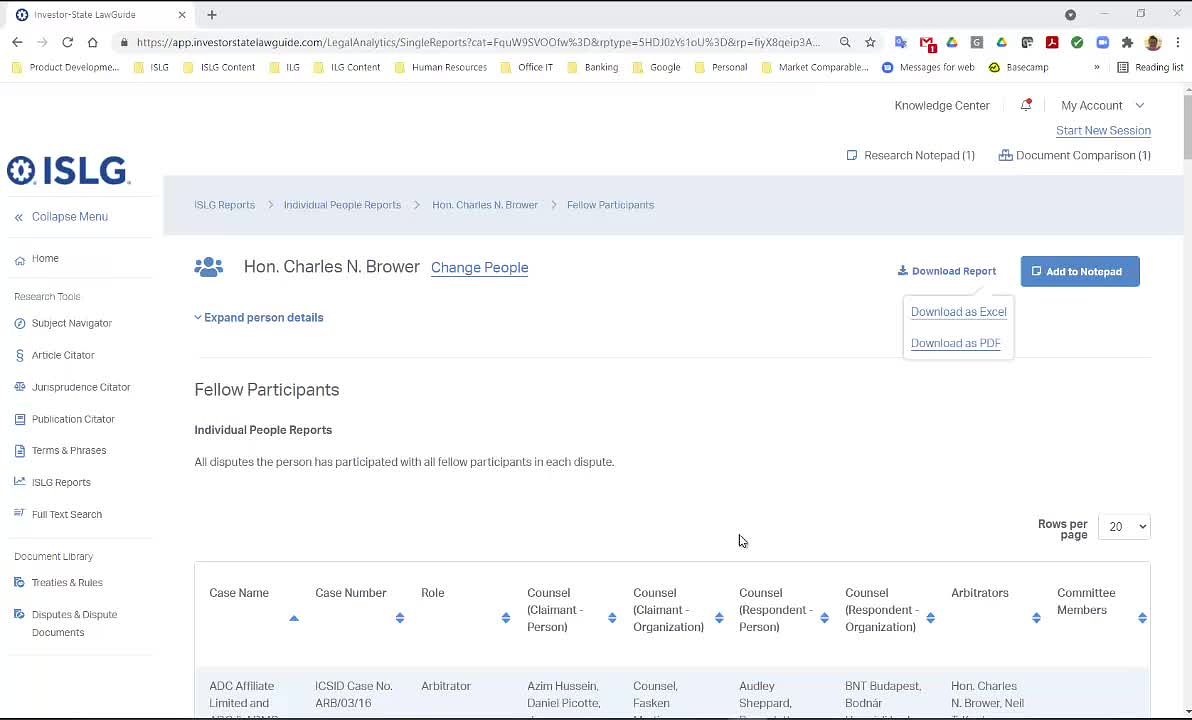
Further to the video below, within ISLG Reports: https://app.investorstatelawguide.com/LegalAnalytics, we want to create the ability to have filters within each column of a report that allow users to do the following:
  • Use checkboxes to select/deselect values within the column that will filter the applicable rows (i.e., only rows with filtered values in the applicable column(s) are presented and included in exported Excel/PDF reports); and
  • Perform a keyword search within search column filter that will match values and automatically select the values that match the keyword search.
As mentioned in the video this filtering function should emulate the filtering capabilities of Excel, but with the benefit of being able to isolate separate values that are contained within the same cell.



Comments & Events

Morgan Maguire, CEO
Hi Naomi Joanis, UX Team Lead at Industrial Naomi and Melissa Cowell, General Manager at Industrial Melissa ,

Further to the requirements above, I would like to create a filter within ISLG reports that emulates the filtering capabilities within Excel for ISLG Reports based on feedback we've received from users. I reviewed the following user stories currently in backlog:
The filtering capabilities outlined in these user stories gives users the ability to filter what rows are presented to users based on requirements similar to the advanced filters that are planned for the FTS and Dispute and Dispute Documents Library (which we still want to develop and will be valuable to users), but I didn't see anything in the requirements that would create filters similar to what is described above. 

Could you confirm whether I am correct, and whether you foresee any problems in UI with creating filters at the individual column level?

Thanks,

Morgan
Naomi Joanis, UX Team Lead at Industrial
Hi Morgan Maguire, CEO Morgan ,

Reviewing the above video and the written criteria for filtering, users will be able to achieve the same result (and more) with the existing filtering criteria and admins would also have greater flexibility with it as well.

Developing the excel style column filters would likely be redundant, as the existing filter criteria allows users to: 
  • Select a column (field) and use boolean operators to filter the values that appear in the report, corresponding to this selected column. 
    • This also includes a searchable dropdown feature to find the values
  • This will filter the rows in the report in a similar way that excel does, to show only rows with data matching the set column filter. 
  • As you mentioned above, this includes selecting specific values that are combined into a single cell for further filtering. 
Existing filter criteria also allows admins to:
  • Designate which columns should be available as front-end filters or not (can determine which columns users can filter and lock others) to maintain the integrity of the report.
  • Designate columns as 'not visible' in the report, which could make these columns available purely for filtering purposes. This can be useful if there are details that could be helpful to users, but are not critical to the report, to allow them to be used as filtering options only. 
Ultimately, designing both solutions would likely be redundant and the existing filter criteria allows for more robust filtering for users and admins and maintains similar UI patterns that exist in the application. 

Let us know if you would like to discuss this further!

Naomi
Morgan Maguire, CEO
Ok. Sounds good, Naomi Joanis, UX Team Lead at Industrial Naomi . We'll remove this item from the backlog then.

However, before I do, could you please tag all the applicable backlog items on DevOps with "ISLG Reports Filters" that will be required to get these subscriber side filter implemented? I'm going to elevate the priority on this feature, and I want to ensure I capture all the various backlog items that are needed to get this built.

Thanks,

Morgan
Naomi Joanis, UX Team Lead at Industrial
Hi Morgan Maguire, CEO Morgan

No problem, I don't have permission to create tags in DevOps. Do you want me to tag you by comment? Or if you can create the tag I can apply it to the applicable backlog items. 

Thanks, 

Naomi
Martin Laporte, CTO at Tologix
Hi Naomi Joanis, UX Team Lead at Industrial Naomi ,

You should now be able to create tags in DevOps.
Let me know if you still have issues.

Thanks,
--Martin
Naomi Joanis, UX Team Lead at Industrial
Hi Martin Laporte, CTO at Tologix Martin ,

Thank you that worked. Morgan Maguire, CEO Morgan I've tagged relevant subscriber side report criteria with the tag "ISLG Reports Filters". 

Let me know if there is anything else!

Naomi
Morgan Maguire, CEO
Great. Thanks Naomi Joanis, UX Team Lead at Industrial Naomi . I've moved all these items into position 30 with respect to their priority in the backlog.

Martin Laporte, CTO at Tologix Martin , depending on how much time Harsh Parikh, Tech Lead at DevIT Harsh and Piyush Kanpariya, DevIT Piyush have for Unplanned/Urgent tasks, could we dedicate any unused time to assigning estimated efforts on all backlog items up to position 58. Ideally we would complete all these items before we retire the legacy application.

Thanks,

Morgan
Paul Moon
Outstanding: 302, 306, 307, 308, 309, 310, 311, 319, 346(partial), 348