













✔ Jurisprudence Citator Quick Links - Ordering Alphabetically
Completed by Nafiseh A.
- Assigned to
-
 Paul M.
- Notes
-
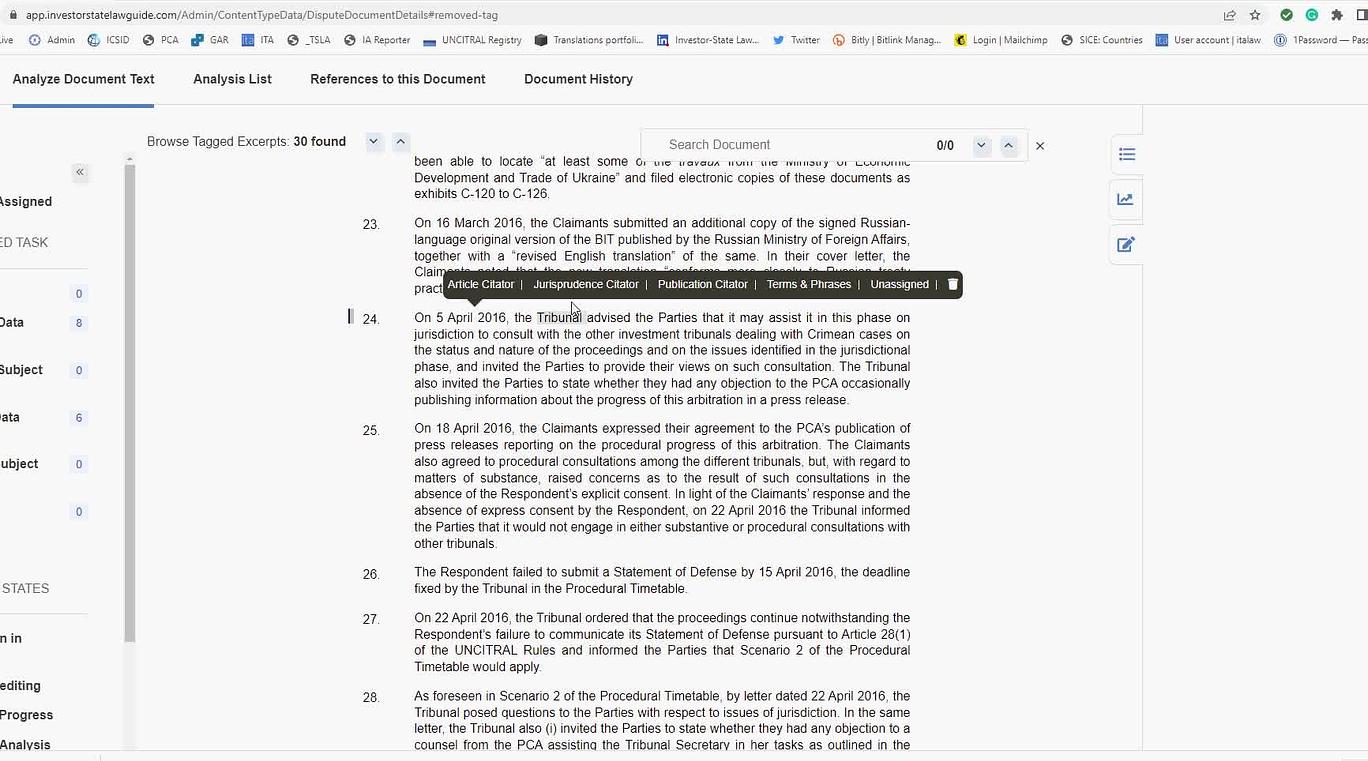
As you see in the video, currently, there is no order in the Quick Link which makes it difficult for the analysts to figure out where the link will be placed and where to find the existing quick link when referring to the same JP reference. Is it possible to have a drop-down menu with all the references (quick links) listed alphabetically (based on the first letter of the short title of the Jurisprudence)?
Thanks,
Nafiseh
This may apply to all citators. Also, I think it might be worth a call with Industrial to streamline throughout the admin site. Let me know what you think.
Thanks,
Paul
It would be a good idea to involve Industrial if we plan on making a UI or business logic change.
On the other hand, if our goal is to just sort the list alphabetically, it should be a relatively simple change at the SQL Server query level, and we can do this on our own.
Thanks,
-Martin
Can we do the following internally:
1. Make the list appear alphabetically; and
2. Make the list drop-down style instead of the current listing everything
If we can do both internally, let's do it, but if #2 requires Industrial, let's chat further about it.
Thanks,
Paul
#1 can be done internally.
For #2, I do not think that replacing the list with a dropdown menu is ideal. A dropdown control will not allow us to remove items from the list. We would also only see one item at a time.
Thanks,
-Martin
CC:
#1: let's get started on it (please create a DevOps)
#2: I am looking for a solution where admin users will not see every single JP chosen under Quick Links (see video above 0:06-0:15), but still want them to have a few options that they can navigate. Below is what an excel macro we had when we were drafting DCDs on excel spreadsheets.
Jurisprudence catalogue represents the whole set of available Jurisprudence, and the Quick List below is what analysts had to work with. I want to modernize this macro and sort the quick list alphabetically (internally possible as in #1), and have a more contained list with scroll up and down option under Quick Links similar to what you see above under Jurisprudence catalogue.
Let me know if we need to involve Industrial or not.
Thanks,
Paul
Let's discuss #2 today.
Thanks,
-Martin
DevOps item https://dev.azure.com/tologix/ISLGRebuild/_workitems/edit/1804 has been created to address request #1 above (sorting list alphabetically).
I will setup a call between you,
Thanks,
-Martin
My initial thoughts here are that we could modify the Quick links area to display a maximum of 3-4 quick links, and the rest would be viewable by scrolling in the same field area. This way we are not changing the control (to Martins point about the ability to remove the links) while also limiting the number of quick links visible at a time, and the real estate it takes on the screen.
Let me know your thoughts, or if you would still prefer to schedule a call to discuss further.
Thanks,
Naomi
Could we have 7-8 displayed instead of 3-4? We also need a search function within those listed under Quick Links as well.
Thanks,
Paul
I don't see an issue with that from my perspective. Please you or
Thanks,
Naomi
I would like to see wireframes first before
Paul
Let me know if there is a better place for this to be posted. Here just showing the search function, with 7 links displayed in the field prior to the scroll being necessary. Let me know if this will work for you.
Thanks,
Naomi
It looks good to me.
Thanks,
Paul
I have created DevOps item https://dev.azure.com/tologix/ISLGRebuild/_workitems/edit/1935 to track this. Please prioritize accordingly.
For efficiency purposes, we should do both https://dev.azure.com/tologix/ISLGRebuild/_workitems/edit/1935 and https://dev.azure.com/tologix/ISLGRebuild/_workitems/edit/1804 in the same sprint.
CC:
Thanks,
-Martin
This task is done and deployed on staging.ilsg. Please check and confirm.
Product Backlog Item 1935: Admin - Changes to Jurisprudence Citator Quick Links
cc:
Could you test this on staging.islg and provide feedback if you have any? If everything looks good, please mark this complete.
Thank you,
Paul
I tested the new feature on staging.islg. I wanted to mention two points as my feedback:
1. As you see in the screen capture below, the quick links are not currently consistent in terms of the fixed area for quick links to display. Some quick links span more than 3 lines whereas some others are not visible beyond the fixed area.
Also, as you see in the video below, for some reason, when I select a quick link, I am taken to the previous links, and I am no longer able to see the quick link I selected unless I scroll down.
Could we look into these two issues?
Thanks,
Nafiseh
Please address two issues identified by
Thanks,
Paul
Regarding issue #1 issue: do you mean that links are uneven in terms of size, i.e.: some links are 3+ lines whereas others are only 1 line? If so, this is by design since some of the links contain a lot more text than others. This means that if we are dealing with only 1-line links, you might see up to 7 of them at once, whereas you might only see 3 links at a time if dealing with links containing more text.
Thanks,
-Martin
Please have a look at the below video in which I explain issue #1
Thanks,
Nafiseh
It appears the reason for the inconsistency you discovered is because of the way how those NU entries appear on the admin site (Case Name or Title). NU/00702 above is entered as shown below (it shows the whole case name).
However, NU/00007 appears as shown below.
Could you update the case name of NU/00007 and see if the quick links show more information you want displayed (e.g., date)
Thanks,
Paul
The above Issue #2 is resolved on staging.ISLG and app.ISLG. Please check and confirm.
cc:
As for issue #1, you are right, Paul. I updated the case name of NU/00007, and now the quick links show more information (e.g., date).
As for issue #2, I checked both staging and app.islg, and it looks good to me. I'll mark this to-do as complete.
Thanks,
Nafiseh