













✔ Modify User Management Dashboard to tracking by groups rather than users
Completed by Morgan M.
- Assigned to
-
 Harsh P.
- Notes
-
Further to the video below, because we have modified the user management systems to track subscriber expiry dates by group, rather than by user accounts, we need to modify what is tracked in cards within the Dashboard:
- Create new "Active Groups" card and modify labels of existing cards as follows
- Active Subscribers => Active Users
- Expired Subscribers => Expired Groups
- Subscribers Expiring this Week => Groups Expiring this Week
- Subscribers Expiring this Month => Groups Expiring this Month
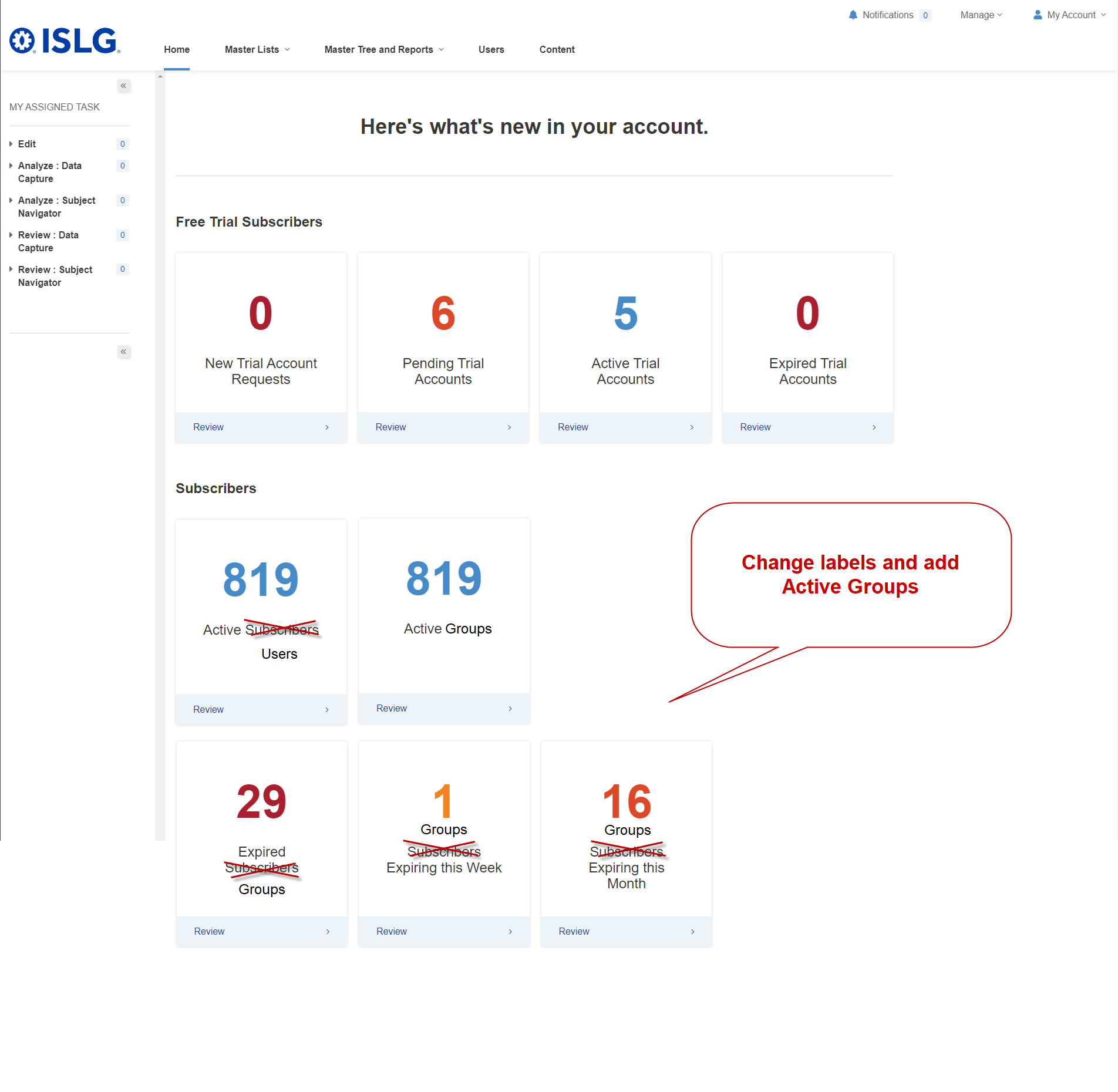
- Ensure the following changes are made to the data tracked in each card:
- Active Users = No change (still tracking a count of total active subscribers in the system (i.e., users with Active (Subscriber) status)).
- Active Group = a count of total active groups in the systems (i.e., groups with Active status)
- Expired Group = a count of total active groups in the system (i.e., groups with Active status and the Expiry Date has been reached or has passed).
- Groups Expiring this week = a count of total active groups in the system (i.e., groups with Active status and the Expiry Date is within 1 week, but has not been reached or has passed).
- Groups Expiring this Month = a count of total active groups in the system (i.e., groups with Active status and the Expiry Date is within 1 month, but has not been reached or has passed).
- Selecting 'Review' on any of these cards should bring the admin user to the filtered users list of groups or users (depending on the card) showing the table filtered for the parameters that created the applicable counts in each card.
- Create new "Active Groups" card and modify labels of existing cards as follows
Could you please provide short video for this requirements so we both are on same page.
Here is a video with more details. Also, we can discuss this tomorrow during our team meeting.
Thanks,
Morgan
In above mentioned requirement, the 4th and 5th Point, We need to consider Group rather than user.
4. Groups Expiring this week = a count of total active groups in the system (i.e., users with Active status and the Expiry Date is within 1 week, but has not been reached or has passed).
5. Groups Expiring this Month = a count of total active groups in the system (i.e., users with Active status and the Expiry Date is within 1 month, but has not been reached or has passed).
Please clarify.
I copied these requirements from the relevant Target Process users story and failed to change the term from users to groups. I've made the corrections above.
Thanks,
Morgan
This task is done on staging.islg. Please check and confirm.
The changes look great but is it possible to expand the width of the dashboard so that all cards are visible without the slider:
Thanks,
Morgan
We have expanded the width of Dashboard page on staging.islg. Please check and confirm.
Morgan