













✔ Overlapping Tags in the HTML when Reviewing Data Capture
Completed by Paul M.
- Assigned to
-
 Morgan M.
- Notes
-
As you see in the screen capture below (UN/0101/17), when there are a lot of references under a paragraph, the bubbles overlap, and I am not able to open all the tags to check the references when reviewing data capture. The number of sidebars also does not correspond with the actual tags created. In the example below, under paragraph 3, 23 tags were created, but the number of sidebars is not 23, and because the bubbles overlap, it is not possible to open them all.
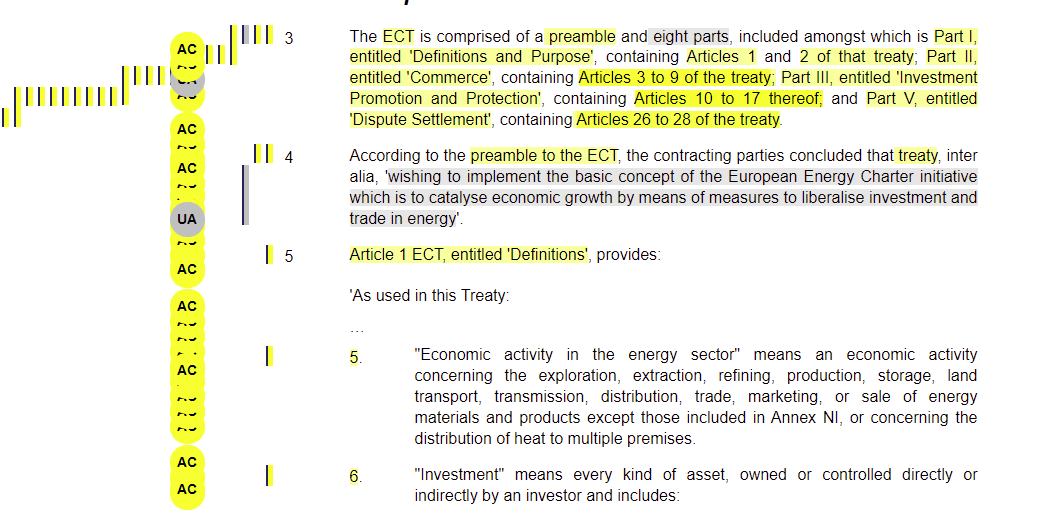
Could the bubbles be ordered in a way that there is no overlap so the reviewer could open all the bubbles and check the references when there are multiple tags in a paragraph?
Thanks,
Nafiseh
CC Paul
Paul
We'll add this to the backlog, but it may take a significant amount of work to resolve this issue. It will require making further modifications to the HTML tagging template, which requires significant input from the Industrial team.
How often are you encountering problems like this? Is it possible to review this by examining the Analysts List?
Thanks,
Morgan
It happens quite a lot when there are multiple references in the paragraph especially when there is a reference to a range of articles/paragraph numbers. Yes, I can review them by examining the Analysis List. However, when I need to make changes in the tags because there is an error, it is not easy to find and open the tag which requires modification.
Thanks,
Nafiseh
Thanks,
Morgan
I discussed this with Mel as well and it seems like a possible solution could be focused around the "Browse Tagged Excerpts" functionality. Because that allows you to tab through each excerpt individually, we could look into a way for the user to select the current excerpt the person is browsing on to open the modal and view the details. It would likely be easier to implement technically than making changes to the sidebar and bubble UI.
Let me know if this could help with this issue.
Thanks,
Naomi
That's not a bad idea.
Morgan
We thought of something similar as well, however, worried this might cause a problem from a technical standpoint and were trying to think of solutions outside of that section. Maybe someone from devIT can weigh in here to see the feasibility of that approach?
Thanks,
Naomi
Thanks,
Morgan
Following-up on above, could you please discuss this week and get back to us what solution is the most technically feasible.
Thanks,
Morgan
Thanks,
--Martin
We discussed this topic this morning, and
If we decide to go the "macro bubble" route, we would first need to allocate time to research possible solutions before being able to put a real estimate to the effort.
If we are after the most straight-forward solution, perhaps we should focus around the "Browse Tagged Excerpts" solution suggested by
What is the priority of this item? Are we likely to tackle this in the next sprint?
If so, I can arrange a short Zoom call with this group to discuss further.
Thanks,
--Martin
Let's proceed with the "browse tagged excerpts" solution in combination with the ability to edit/delete tags directly through the Document Text view and Analysis List as outlined in the following backlog item: https://dev.azure.com/tologix/ISLGRebuild/_backlogs/backlog/ISLGRebuild%20Team/Backlog%20items/?workitem=259, which has some outstanding requirements to be written as well.
I've create a backlog item immediately after item 259: https://dev.azure.com/tologix/ISLGRebuild/_backlogs/backlog/ISLGRebuild%20Team/Backlog%20items/?workitem=1123, which will put it in order #50, and thus, will not be addressed for a few more sprints.
However, let's plan to setup a session in the first week of November (after retirement of legacy) with
Thanks,
Morgan
As we discussed, We are highlighting the tagged expert with different color when the admin user put hovers on a bubble or line.
We deployed this thing on staging.ISLG. Please check and confirm.
cc:
Could you test this on staging.islg admin site (please create a draft of an existing DCDs with tags) and report back here whether the fixes that
Thank you,
Paul
I wanted to test this, but the staging site is not responsive...
I will try first thing tomorrow morning and report back.
Séverine
Thanks,
Paul
I did some testing on the staging environment.
The fact that the tag changes color (to purple) when one hovers over the side bubble is definitely useful. It allows the reviewer to immediately and accurately identify the correct reference. Thank you Martin and Harsh. I look forward to seeing it deployed on the admin.site!
Séverine
Best,
Paul