













✔ Problem with "add to group" function in Treaties and Arbitration rules - HIGH PRIORITY
Completed by Morgan M.
- Assigned to
-
 Melissa C.
 Naomi J.
- Notes
-
Further to the video below, I am having trouble making the "add to group" function work within Treaties and Arbitration rules. The links are not working, and I am not able to add documents to a group.
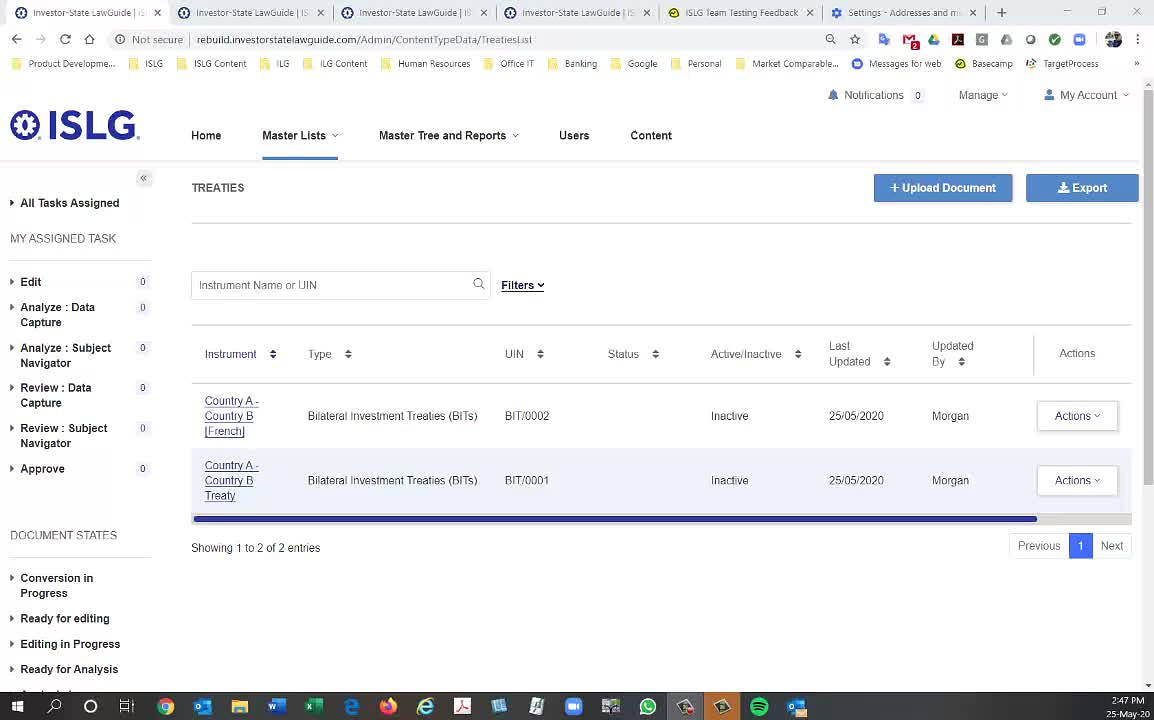
This has been marked as a high priority to-do.
Thanks,
Morgan
Regarding the two issues raised above:
1. For Treaties and Arbitration rule entries that are created by 'Skipping' upload, they do not have the option to be added to a group, like an HTML or PDF only document would. I believe this is why this option is disabled in the case you are showing above. See more in the comments on this story here:
https://industrialagency.tpondemand.com/restui/board.aspx?#page=userstory/12709&appConfig=eyJhY2lkIjoiNkIwOEFBRTU1NUY0ODJDNDU1NDA1NzJFQkE5N0JGQjkifQ==
2. Regarding HTML upload after a document record is created, PDF only documents will have the option to upload an HTML file once the document is uploaded, and/or manually create provisions. However if the admin skips upload, they will only have the option to manually create provisions.
see: https://industrialagency.tpondemand.com/restui/board.aspx?#page=board/5389754907359543952&appConfig=eyJhY2lkIjoiNkIwOEFBRTU1NUY0ODJDNDU1NDA1NzJFQkE5N0JGQjkifQ==&boardPopup=userstory/14777 and https://industrialagency.tpondemand.com/restui/board.aspx?#page=userstory/12063&appConfig=eyJhY2lkIjoiNkIwOEFBRTU1NUY0ODJDNDU1NDA1NzJFQkE5N0JGQjkifQ==
If you try the above steps with a PDF only or an HTML document, adding the document to a group functionality should work as expected
I'm going to add this the agenda for discussion on Thursday.
In the meantime, based on the comments in the user story #12709, my understanding of why the "add to group" function is not working for me in the video above is because of the following:
Thanks,
Morgan
This issue has resolved in Treaties & Arbitration Rule Master. Please check and confirm.
The issues are resolved. Marking to-do complete.
Thanks,
Morgan