












✔ Problem with creating and publishing drafts
Completed by Morgan M.
- Assigned to
-
 Harsh P.
 Melissa C.
 Naomi J.
- Notes
-
Further to the video below, we have been experiencing issues when attempting to create and publish drafts. When attempting to discard or publish drafts, the drafts are not getting removed from the master list.
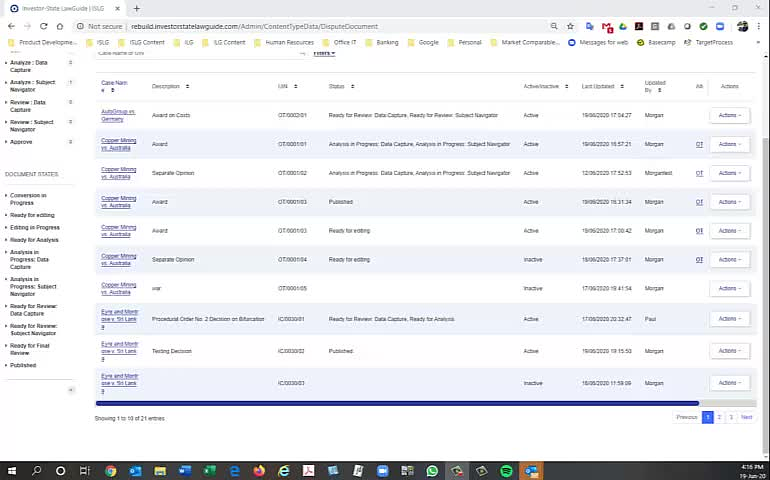
This is not bug. We have developed the functionality like without complete the Analyze : Data Capture or Analyze : Subject Navigator Task the system will be automatically created the new draft version.
so, as per above attached video, you are going to publish the draft version without complete the above mentioned task.
you can see the incomplete task popup before publish the draft version in your video.
The scenarios is happened like you publish the draft version without complete the tasks so system will automatically create new draft version. Hence, you were able to see multiple entries with same document.
If you complete above 2 mentioned task and then publish the document that time system will not create draft version automatically.
Morgan
Further to our discussion this morning, it sounds like the issues above is not a bug. However,
Thanks,
Morgan
Following up on my previous comment, could you confirm whether we can resolved this to-do.
Thanks,
Morgan
I have reviewed. This process could be refined.
Ideally if there are no assigned tasks, or tasks that have been started but not completed, approving and publishing the draft would eliminate the draft version.
I will create a bug in Target Process to address this.
Mel
Morgan
We forgot to discuss this this morning, but go ahead and report the bug, and I'll report my other issue through a to-do.
Thanks,
Morgan
I've created a bug for this here:
https://industrialagency.tpondemand.com/entity/16721-improvement-publish-draft-greater-no-assigned
Mel
Morgan
This change has been done on rebuilddemo.islg and also move relevant card in UAT.
The above target process story is already done on rebuilddemo.islg. Please complete this task.