











✔ Problem with Reports
Completed by Morgan M.
- Assigned to
-
 Harsh P.
 Ketan S.
 Melissa C.
 Naomi J.
- Notes
-
Further to the video below, there is problem with the results I'm getting with reports within staging.islg. I've gone through the pending user stories/bugs in Tartget Process, and none of these appear to address this issue.
I created the following report in staging: https://staging.investorstatelawguide.com/Admin/Report/AddUpdateReport?RMId=iFKpRWB%20jN4=&rMasterId=iFKpRWB%20jN4=&catid=FquW9SVOOfw=&typeid=5HDJ0zYs1oU=
This report is meant to show the roles that a individual person has played in disputes. As described in the video, certain columns are displaying data values that are not relevant to the person in the report. For example, when generating the report for J. Christopher Thomas QC, the Organization column is listing all values listed in any of the selected fields, rather than only the values that are relevant to J. Christopher Thomas QC:https://staging.investorstatelawguide.com/LegalAnalytics/SingleReports?cat=FquW9SVOOfw%3D&rptype=5HDJ0zYs1oU%3D&rp=iFKpRWB%20jN4%3D&cmid=uoxYnUD%20c8k%3D&mid=A8xoUq8Z0MM%3D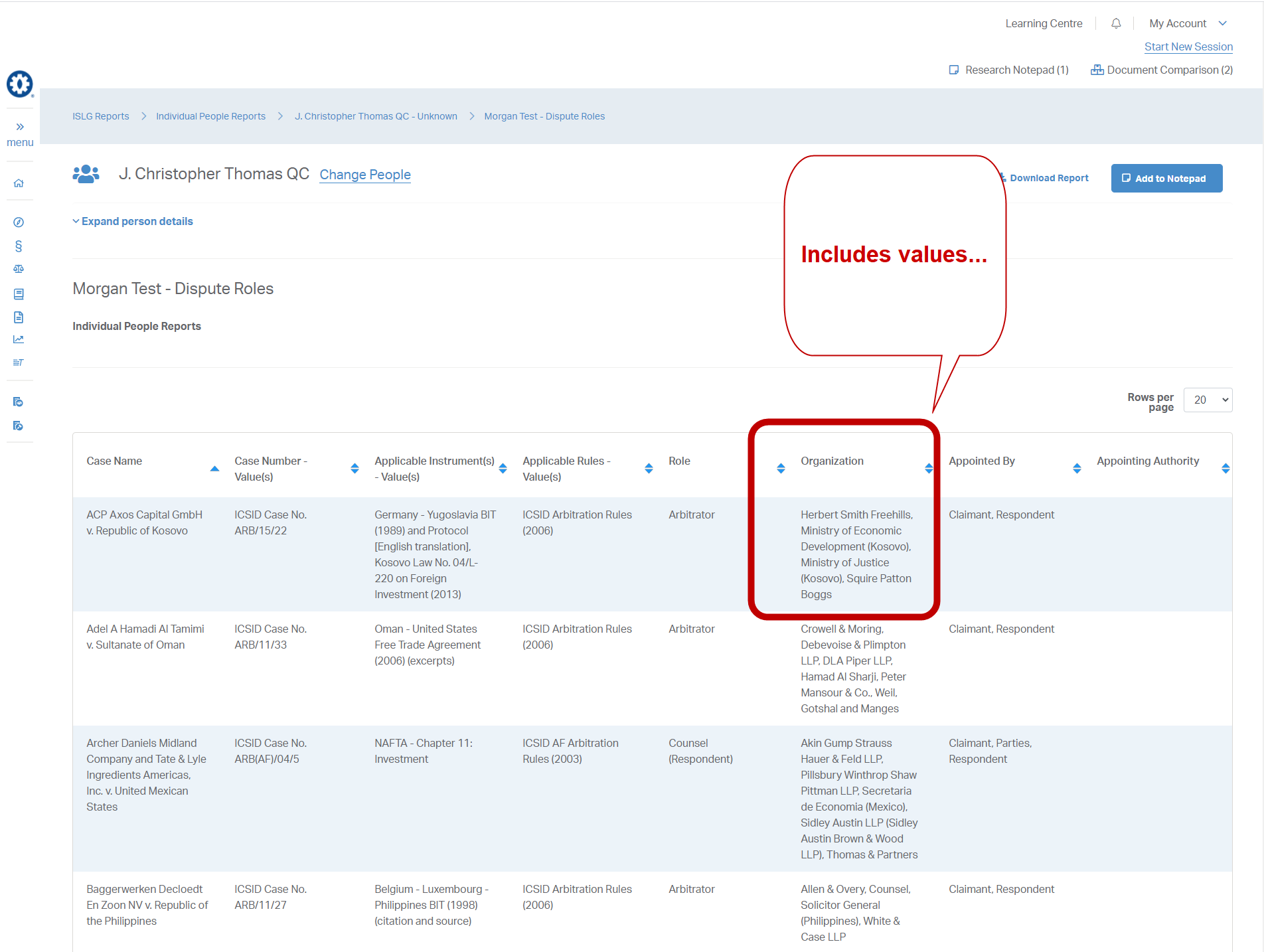
From IC/0248 - Axos Capital v. Kosovo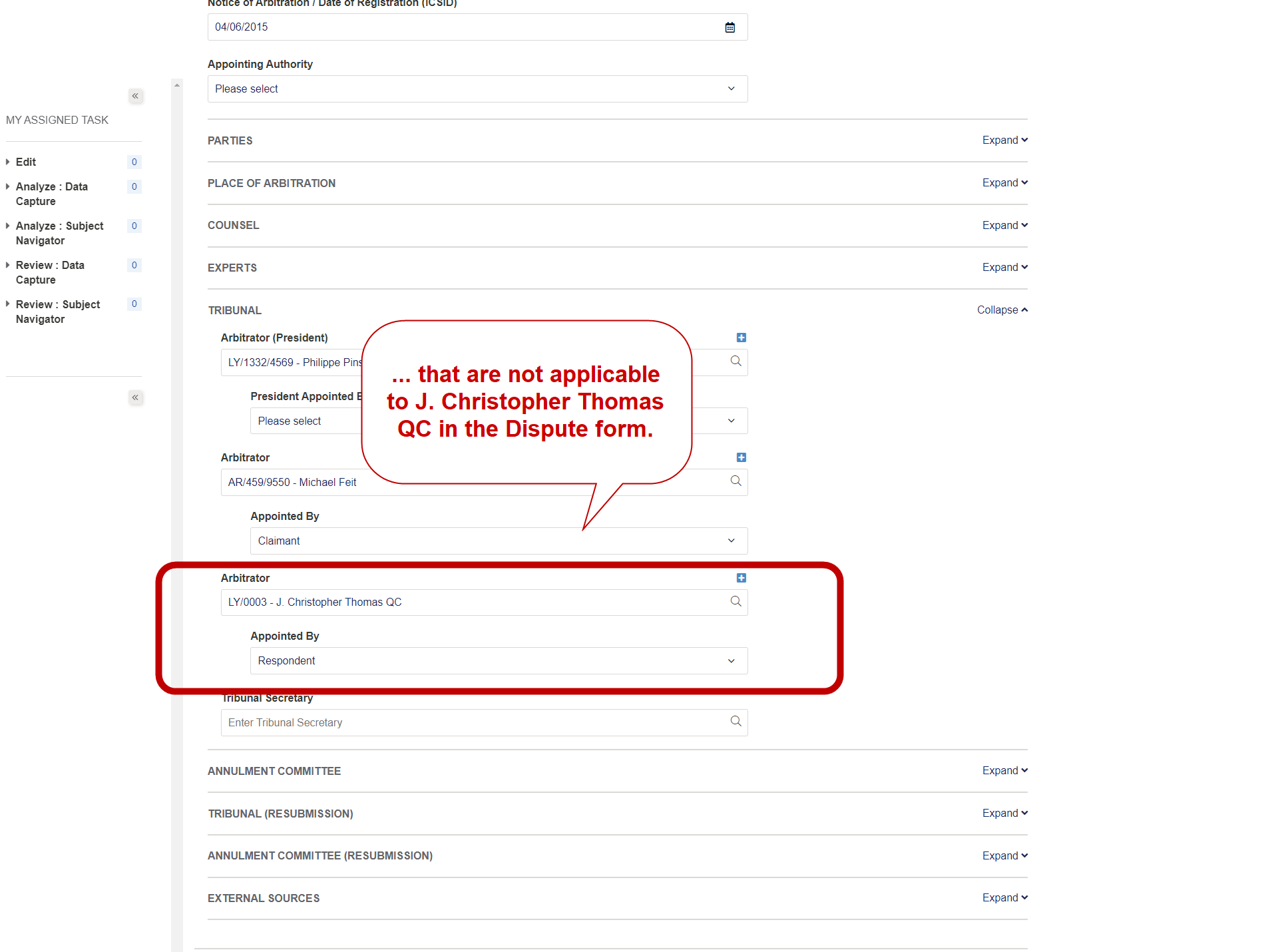
and another example AF/0006 - ADM v. Mexico: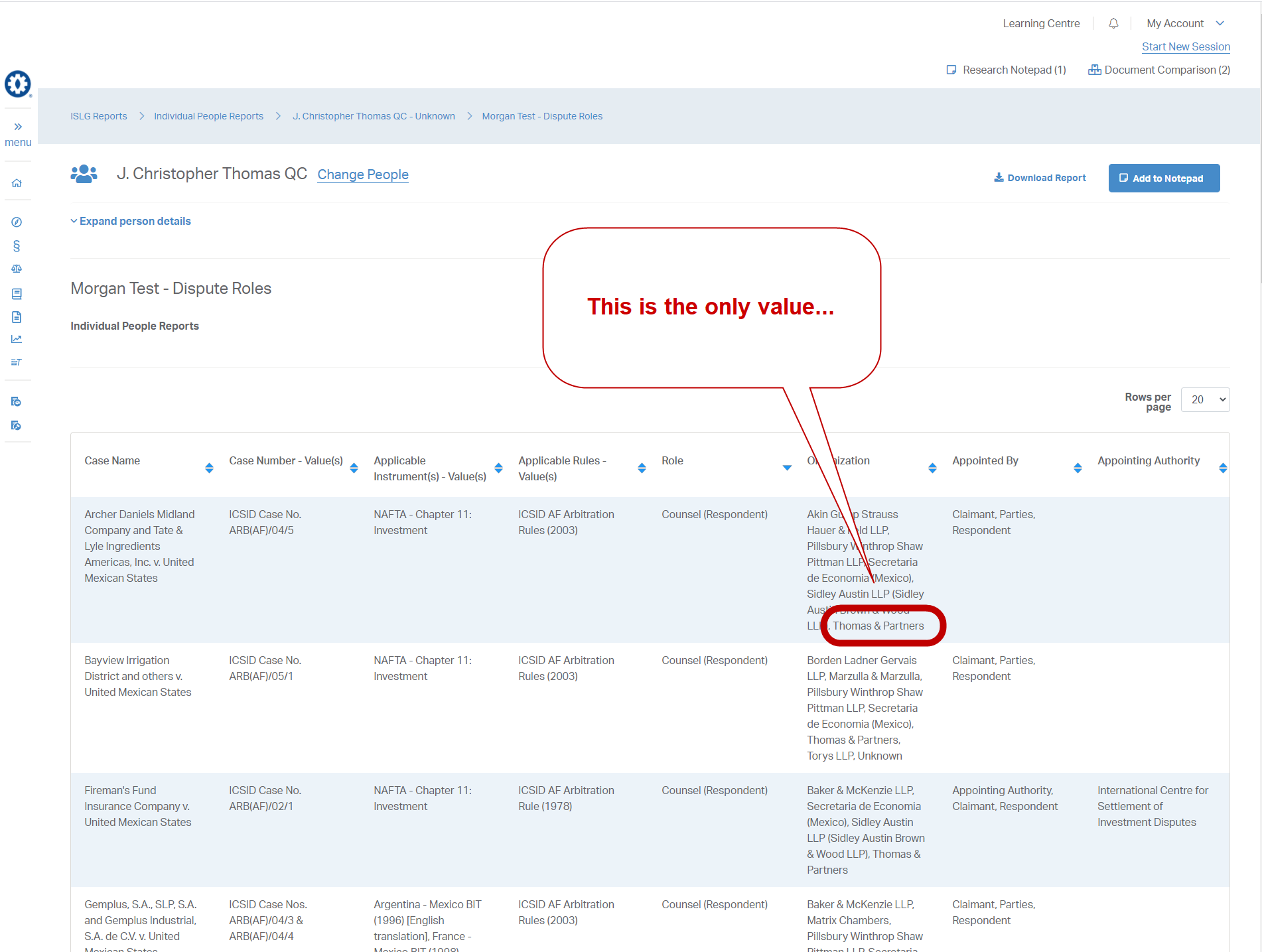
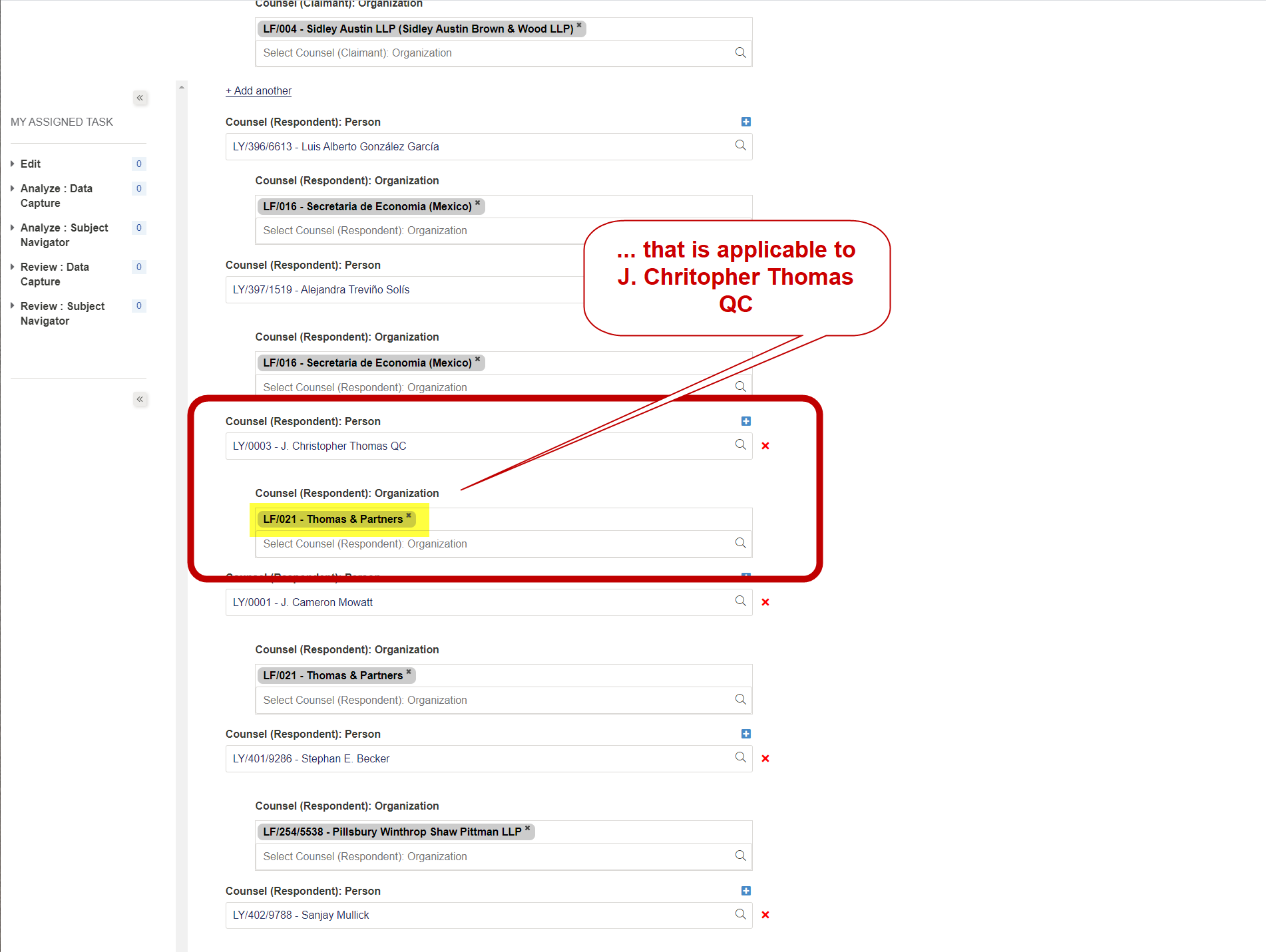
Could you please ensure the above is reviewed and a solution proposed in advance of tomorrow's meeting. This is show stopper if we can't generate the reports required with ISLG Reports.
Thanks,
Morgan
Looking into this it seems like only part of the criteria that is highlighted in https://industrialagency.tpondemand.com/entity/13068-report-greater-dimensions-and-filters-greater has been implemented, where when we discussed it last week it seemed like it had all been done just by virtue of the implementation.
What seems like is happening, is that fields such as "arbitrator president" are being filtered by the record value (J. Christopher Thomas QC) to show data that is only relevant to the selected record, but child fields such as "Organization" or "Appointed by" are not filtering the data based on if the record value is present in the parent field. I'm not sure if there is a workaround for this, however since this seems to be working for the top-level fields, I wonder if it would be possible to extend the same logic to the child fields.
Thanks,
Naomi
Thanks,
Morgan
Again, this is critically important that we resolve before the weekend.
Thanks,
Morgan
Following-up on above, I've been spending time this evening creating the reports required for launch, and I generated the following report to show what people values appear within the same dispute form as the record value: https://app.investorstatelawguide.com/LegalAnalytics/SingleReports?cat=FquW9SVOOfw%3D&rptype=5HDJ0zYs1oU%3D&rp=fiyX8qeip3A%3D&cmid=uoxYnUD%20c8k%3D&mid=A8xoUq8Z0MM%3D
The highlighted columns are the product of the current settings that generate all values listed in any of the selected fields, rather than only the values associate with the record value. This is the desired result in this example, and is an example of why in some circumstances we will need all values and in other circumstances we will need only the value associated with the record value. This confirms the need to integrate an option that allows the admin user to determine whether to "see all values" as highlighted section of the user story 13068: https://industrialagency.tpondemand.com/RestUI/Board.aspx#page=userstory/13068&appConfig=eyJhY2lkIjoiRUM0QzUwNTU4QzZBNUQ1NjQxRkNGNUQyM0FFRDQxM0YifQ==
I cannot see another solution without this option available.
I understand that this does not resolve the performance issues with applying this filter to child fields, but we need to integrate this into the solution.
Let me know what you're able to achieve during your discussions tomorrow, and we'll determine next steps.
Thanks,
Morgan
We are working today to display child filed only particular that record rather than all child fields but to integrate this option to admin side is not possible for us at this time.
I hope you can understand.
As mentioned above, applying one option over another will not achieve the result we need. We need both options to generate the reports we need. I'll leave it to you on how best to achieve that solution, but please take my comments above under close consideration before you implement anything that would jeopardize the report I've produced above.
Thanks,
Morgan
We have thought of below solution for above requirement to fix in short time frame.
Solution will be: you can create both type of Reports - For all values and person wise values report.
For Example, You need to create Report A and Report B. After you generated both reports in admin side then provide the report name list to us so that we can set flag for all or person wise values.
Report A – For All Values, Report B- Particular Person Wise Value. So, after generating reports in admin you can view one report with person wise value in all related columns of report and other one will show all values in all related columns.
Per yesterday call, we are working on speed issues of fetching child records for particular person wise which seems to be achieved in reasonable time.
Let me know if this will work for you.
Thanks,
Ketan Sondarva
Ok. Sounds good. Does that mean we would have to provide you the settings for each report generated? Also, will we be able to make the settings specific to each column? For example in Report A, could we make columns 1 and 2 "all values" and then column 3 "only values relevant to the record value"?
Thanks,
Morgan
We will set flag at report level not at column level. It means you need to provide report names after you generate it from Admin. so one report for all values in all columns and second report will be particular person level record value for all columns.
Thanks,
Ketan
I'm not sure if that would work then. We need an option to set which values are displayed for each column, which will vary within each report. For example, with the report referenced above: https://app.investorstatelawguide.com/LegalAnalytics/SingleReports?cat=FquW9SVOOfw%3D&rptype=5HDJ0zYs1oU%3D&rp=fiyX8qeip3A%3D&cmid=uoxYnUD%20c8k%3D&mid=A8xoUq8Z0MM%3D
Column 3 is limited to only values that are applicable to the record value:
Whereas Columns 1, 2, 4-8 includes all values from the selected fields (not associated with record value):
Similarly, for the following example: https://app.investorstatelawguide.com/LegalAnalytics/SingleReports?cat=FquW9SVOOfw%3D&rptype=5HDJ0zYs1oU%3D&rp=mScOmwarSG4%3D&cmid=uoxYnUD%20c8k%3D&mid=A8xoUq8Z0MM%3D
Columns 5-8 should be limited to values that are applicable to the record values:
Whereas, columns 1-4 include all values from the selected fields:
Would we be able to generate the desired reports in the examples above with the changes you've proposed?
Thanks,
Morgan
We have checked this yesterday through out the day and found below solution per your suggestion to implement this at database level only as of now.
You have to provide us Report Name with the Field list with the option for "All Values" or "Record Value". You can share us an excel sheet with this details.
By Default we will set All Values Flag in database and once you provide Report Name and Column Name list with value flag for each field then we will update flag on those columns for fetch particular record value in database.
I hope this will be definitely serve your purpose for Reporting.
let me know for any query and please confirm if this works for you as to implement this we need 1 to 1.5 working days and should upload by mid of next week.
Thanks,
Ketan
Morgan
Following-up on above, would it be possible to implement this on a sample report within staging.islg to confirm that this solution will work properly when we modify the reports on app.islg, or will this essentially double the work having to do it on both staging.islg and app.islg? Also, will this mean any future report we need to created that needs a "record value" column will require 1 to 1.5 working days to construct?
Lastly, are we confident that with this solution that setting columns to "record value" will not compromise the performance of loading the reports on the Subscriber side?
Thanks,
Morgan
Yes we will implement a sample report we receive from you and set flags in staging first to verify report is generated as per your requirement along with its performance. Also, that would not take much time for us to implement other reports setting after wards as we just need to set it in backend database and verify at our side with values its generating.
The performance will be increased compared to what we have before which was taking 1.5 mins but this solution will take couple of seconds but we will tell u exact time once you provide us sample report to generate.
thanks,
Ketan
Also,
Thanks,
Morgan
Here is an export of the following Morgan Test - Dispute Roles within People reports: https://staging.investorstatelawguide.com/Admin/Report/AddUpdateReport?RMId=j3fbwohxX98%3D&rMasterId=j3fbwohxX98%3D&catid=FquW9SVOOfw%3D&typeid=5HDJ0zYs1oU%3D
In the Report tab, I have highlighted the following columns in yellow:
Thanks,
Morgan
We have updated following 4 values flag in database to display only Particular record value for following report link on staging.islg.
https://staging.investorstatelawguide.com/LegalAnalytics/SingleReports?cat=FquW9SVOOfw%3D&rptype=5HDJ0zYs1oU%3D&rp=j3fbwohxX98%3D&cmid=uoxYnUD%20c8k%3D&mid=A8xoUq8Z0MM%3D
Also, Here, I have attached Sample Spread Sheet for your reference so in future you can provide report name and column field in this format.
Please check and confirm.
The updated report looks great. Thank you for getting this complete.
I will generate the reports within app.islg over the next few days, and provide you with the list of reports to update based on the sample you've provided above.
Thanks,
Morgan
Further to the videos below, I'm experiencing new issues with Reports in both staging.islg and app.islg. Could you please ensure both these problems are results directly in staging.islg and app.islg so that I can create the reports I need.
Thanks,
Morgan
All 4 points are resolved on app.islg and staging.islg. Please check and confirm.
All the issues except #3 above are resolve. Below is video describing the problem where creating a draft alters the specified order of the columns and making edits to the selected columns caused the descriptions of the columns to default back to the field labels, forcing the user to re-enter the column names again.
Also, for issue #4, it is resolved for the example in IC/0120, but could you provide a little detail on what the problem was? I just want to ensure we won't experience this with other reports and data.
Thanks,
Morgan
I've discovered another issues with ISLG reports. Further to the video below, it appears that date entered into historical fields in the Dispute form are not getting recognized within ISLG reports when generating a report based on a specific record value. For example, in Dispute UN/0029 - Gallo v. Canada, LY/0003 - J. Christopher Thomas QC is a former arbitrator on the tribunal:
This should cause UN/0029 to be listed in the following report when LY/0003 is the record value: https://app.investorstatelawguide.com/Admin/Report/AddUpdateReport?RMId=3u6lnc9%20sXg=&rMasterId=3R3oFtTyC2k=&catid=FquW9SVOOfw=&typeid=5HDJ0zYs1oU=.
Is it possible to resolve this tomorrow, because missing these records from the reports will cause a lot of missing data for certain types of People reports.
Thanks,
Morgan
Perhaps this is something that needs to wait until post-launch, but it would give users context on whether the person's role is current vs. former.
Thanks,
Morgan
As per requirements, We are not fetching any historical data field to create report. We will take this after post launch.
In additional to above, further to the video below, I am having trouble reordering groups within the reports. It won't let me put a group with sub-groups are the bottom of the report list.
Thanks,
Morgan
I'm really not comfortable launching without that historical data included in the reports. It will get noticed by users quite quickly. In particular, it prevents us from generating accurate data concerning challenges. If a challenge results in the arbitrator resigning from the tribunal, not including the historical data will result in that dispute not getting included in their challenge report.
Morgan
If possible then we take quick call to discuss history data in report.
We are available in office till 7:30 PM IST. (It means till 7:00 AM Vancouver time).
If you are wake up and possible so we can communicate.
If possible then please provide Report Sample Sheet by today so we can update All Value / Particular Value flag through back end.
As we don't want to add/update anything after tomorrow.
Here is the report sample sheet outlining the reports that require the value in the applicable column to include only values relevant the record value (highlighted in yellow). I have also highlighted two reports (in red) that require including historical data as we discussed earlier today.
Let me know if you need any other details.
Thanks,
Morgan
As per your provided spread sheet for report sample, We have updated the All value and Person Value flag on app.islg. Also, As we discussed, only for mentioned 2 reports as per excel sheet, we have fetched historical data for specific only 2 reports.
Looks like the changes have been implemented. However, we have a couple of issues with what data is displaying in the reports:
Thanks,
Morgan
We are working on to resolve above 3 issues related to data and will resolve by tomorrow morning and will update you by (near about 11:00 AM Ahmedabad time) time once we are verified all the reports.
Given the tight timing, let's discuss during our call today.
Thanks,
Morgan
Above 3 issues related to data have been resolved on app.islg and we have verified data by our self and it seems to be OK now.
Please check and Verify.