












✔ Problem with session tracking when session ends because of inactivity
Completed by Morgan M.
- Assigned to
-
 Harsh P.
 Naomi J.
- Notes
-
In the legacy application, when a user in inactive on the Subscriber side of the application for 30 minutes, the existing session is ends, and then the user is required to login to the system again to start a new session that is track as a completely new session. This ensures that the time between when the existing session ends (because of inactivity) and the person logs back into ISLG does not get added to the person's usage data.
Further to the video below, in the new application, the prompt appears after 30 minutes of inactivity, but it does not cause the session to end. The user can select "Start Session" and it resumes the existing session. This setup is ok; however, could Melissa
Also, if selecting "Start Session" does resume the existing session, rather than starting a new session, shouldn't the label of the link be changed to "Resume Session".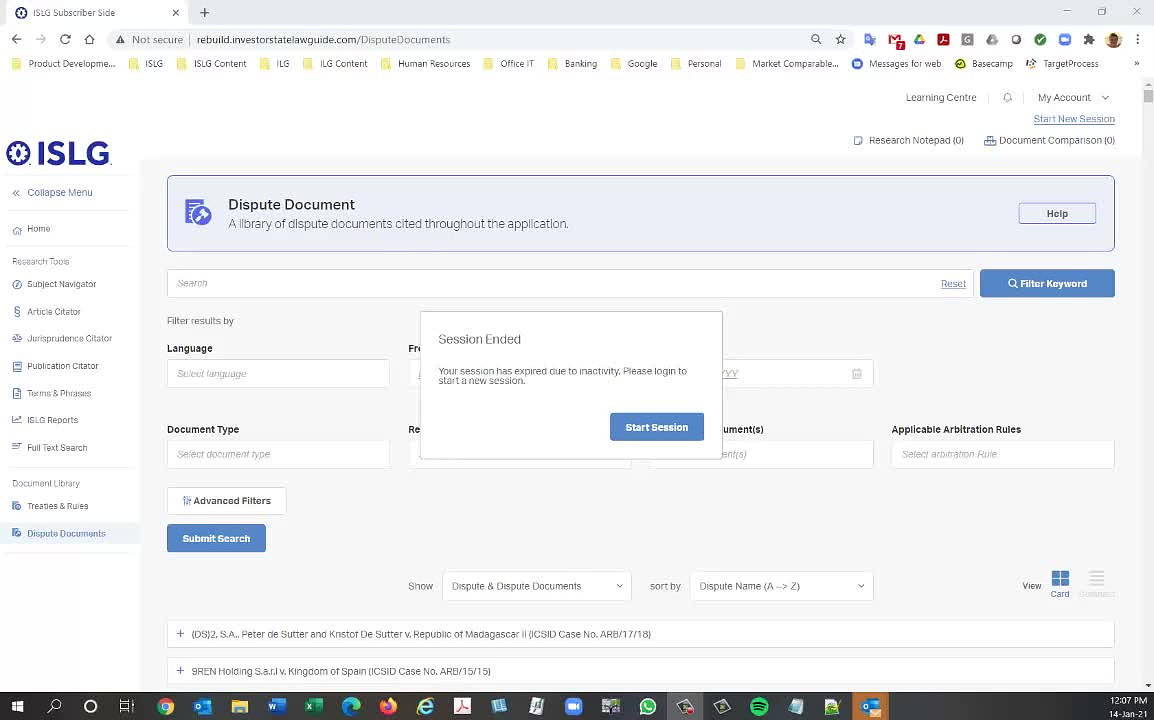
What should happen is that clicking "Start Session" requires the user to start a new session, meaning they need to select a client & subject matter to assign their time to. This means that the timer is stopped when the prompt to start a new session occurs, and is started again once a new client/subject is selected.
Thanks,
Morgan
As per requirement, When the session inactive popup open (after 30 minute) and user press Start new Session then the session tracking will be resume again. It means we are not creating new session the session tracking data will be logged in existing session.
However, no one has answered my critical question above. Does the time that elapses between when the popup opens and when the user selects Start Session get recorded and added to the during of the session?
For example, is this how a session's duration would be tracked?
Thanks,
Morgan
I am unable to confirm your question as yesterday and today my session didn’t end through 30 minutes of inactivity, which would prompt the session timeout message (I left a session inactive for many hours yesterday in an incognito tab). This was tested and working previously so I’m not sure what is affecting this. I have logged a bug for this (https://industrialagency.tpondemand.com/entity/21252-session-ended-greater-session-end-prompt).
This may be worth discussing on Thursday, as when I went back to this card we noticed that ending a session on browser close was not included in UAT. I have written criteria to ensure this is covered (https://industrialagency.tpondemand.com/entity/21260-st-greater-session-ended-greater-session), but confirming on Thursday that it doesn’t pose any technical difficulty might be helpful as well.
Thanks,
Morgan
I am just confirming that I tested the session timeout on staging.investorstatelawguide and I am still not receiving the 30 minute timeout prompt. The sessions are also not ending for me on tab/window closing as well. I have responded back to Harsh with my version of chrome on the relevant bug.
Thanks,
Morgan
The both card of this task has been done on staging.islg. Could you please complete this task ?
Thanks,
Morgan
Yes the issues discussed above have been resolved on the subscriber side. There is still one outstanding card 'In Testing' (https://industrialagency.tpondemand.com/entity/21504-st-greater-session-timeout-behaviour-for) related to the messaging on the prompt and behaviour for 'suppressed' session tracking users, however we could close this to-do and resolve that issue through target process when it goes through UAT.
Marking this to-do completed.
Morgan