













✔ Problems with changing Dispute Document UIN in Subject Navigator
Completed by Irit W.
- Assigned to
-
 Morgan M.
- Notes
-
cc
 Paul
Paul
 Nafiseh
Staging Admin Site issue: Problems with changing Dispute Document UIN in Subject Navigator
For example, if Subject Navigator entries referring to IN/0090/05 need to be changed to IN/0090/10, I'm not able to do so
In the Staging Admin Site, Master Tree and Reports, Subject Navigator, search:- Illegality
- Getma v. Guinea Award considers only investments that are lawful and made in good faith are protected by ICSID arbitration; the tribunal must declare itself incompetent if it appears that the investment has been made fraudulently or as a result of corruption
- IN/0090/05 - Getma v. Guinea Award - 16 August 2016 - French
Pinpoint references: pa174 - Actions, Edit Branch
I can delete Dispute Document UIN IN/0090/05, but the issue is that I cannot add Dispute Document IN/0090/10 in its place.
IN/0090/10 does not appear in the drop down menu:
Link to Staging Admin Site: http://staging.investorstatelawguide.com/Admin/SubjectNavigator/Index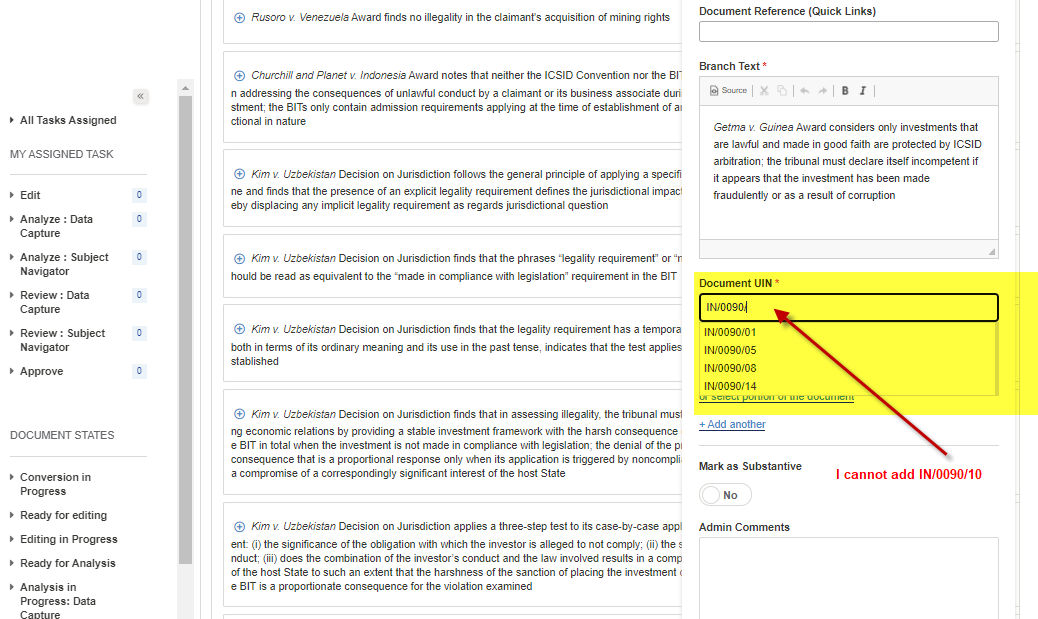
Dispute Document IN/0090/10 was set as "alternate" instead of "primary" on the Staging Admin Site. It's now set as "primary" and appears in the search field in the screen capture above.
This is no longer an issue. I will mark this to-do as complete.
Thanks,
Irit