











✔ Problems with field labels in Report
Completed by Morgan M.
- Assigned to
-
 Harsh P.
 Ketan S.
 Melissa C.
 Naomi J.
- Notes
-
Further to the video below, when adding columns to a report through the "Select Existing Data" the field labels include " - Value(s)" or " - No of Values" in the label of the report on the subscriber side, and there is no way edit the label unless you create a custom columns. This effectively eliminates the usability of "Select Existing Data" and forces us to create custom columns for every report. Please changes this so that " - Value(s)" or " - No of Value(s)" is excluded from the field label in the subscriber side of ISLG Reports.
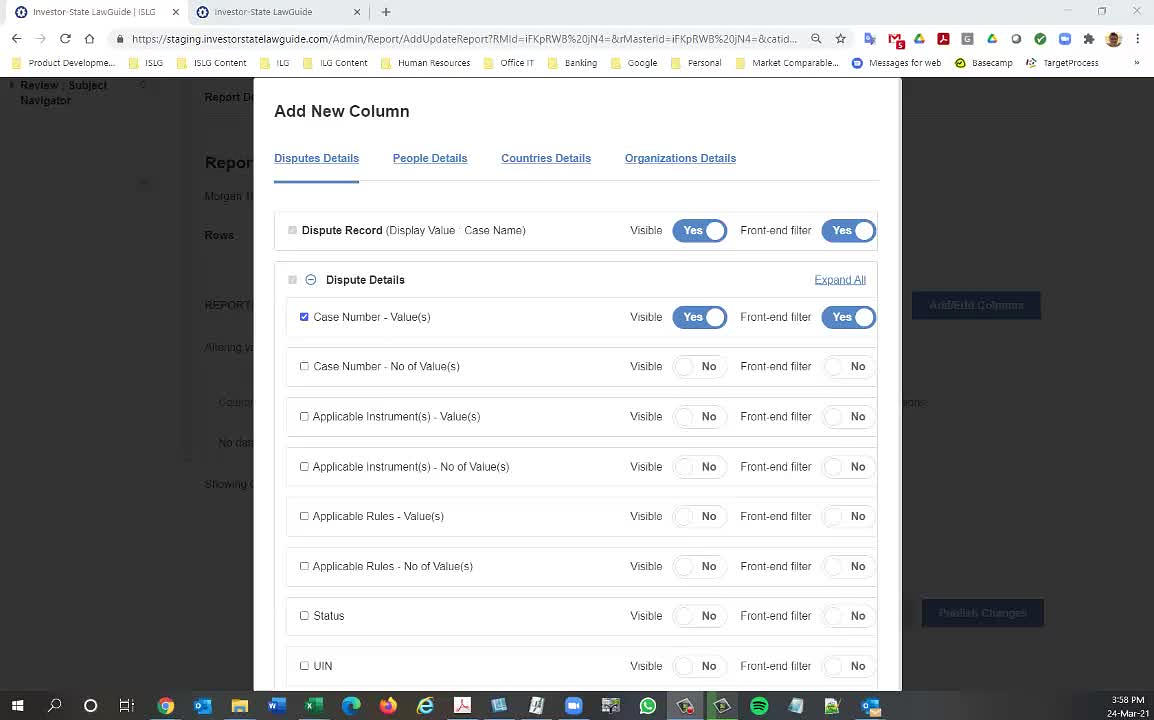
You can edit column header label through action menu from column tab. Go to column tab click on action menu and click on Edit and update column header.
Same thing we discussed with Melisa and Naomi.
Hope this is fine.