














✔ Request: Display Subject Navigator branch details when in Edit mode
Completed by Paul M.
- Assigned to
-
 Martin L.
- Notes
-
Request: Display Subject Navigator branch details when in edit mode on app.islg Admin site.
In legacy.islg admin site, when you are viewing a subject in SN edit mode, you are provided with the Subject Navigator branch and sub-branch details.
For example, see SN entry under:
- J- Jurisdiction (generally)- Jurisdiction ratione materiae- General and specific discussions of jurisdiction ratione materiae- SGS v. Pakistan Award on Jurisdiction notes that the same set of facts can give rise to different claims grounded on differing legal orders: the municipal and the international
Select Edit Node: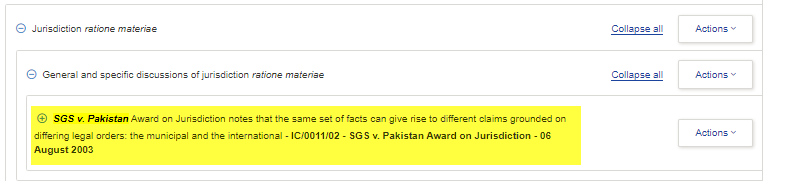
When I view it in edit mode, the Subject Navigator branch and sub-branch details are listed.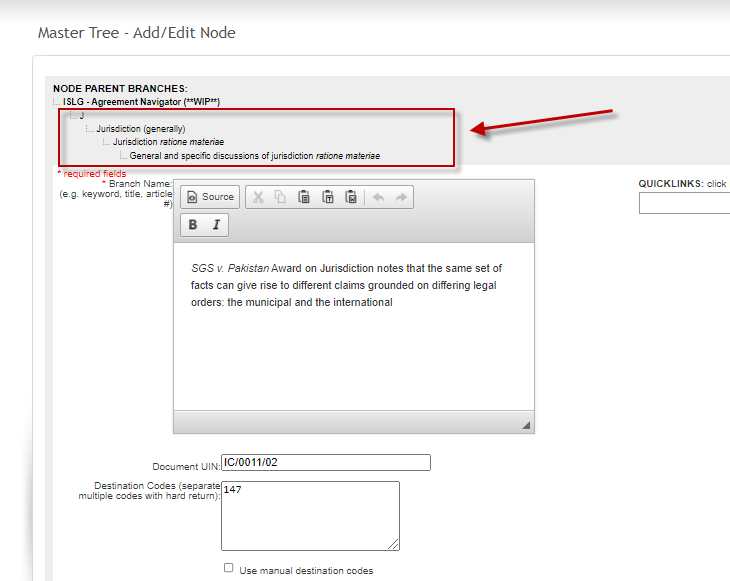
We would like the branches and sub-branches to be listed on app.islg Admin Site SN edit mode.
Using the same entry as an example:
When I click Edit, the branch details are not included: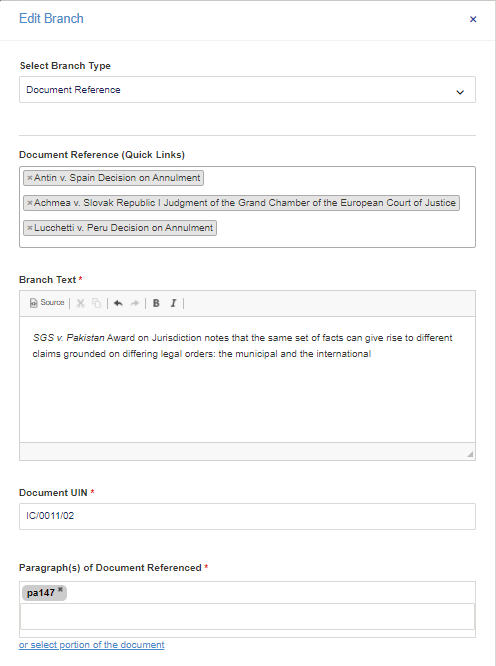
Thank you,
Irit
Please create a backlog on DevOps for this, and I'll adjust the priority.
Thank you,
Paul
I have created DevOps item https://dev.azure.com/tologix/ISLGRebuild/_workitems/edit/1264, and it is currently sitting at the bottom of the backlog.
Thanks,
--Martin
Paul