












✔ Selecting "Publish" does not take the user to the main page
Completed by Paul M.
- Assigned to
-
 Martin L.
- Notes
-
I am encountering an issue that I had not experienced before and that is when I select "publish" (when I want to publish a Draft or publish the DCDs), I am not taken directly to the main page. I need to select "Cancel", and go back (by selecting <- Dispute Documents).
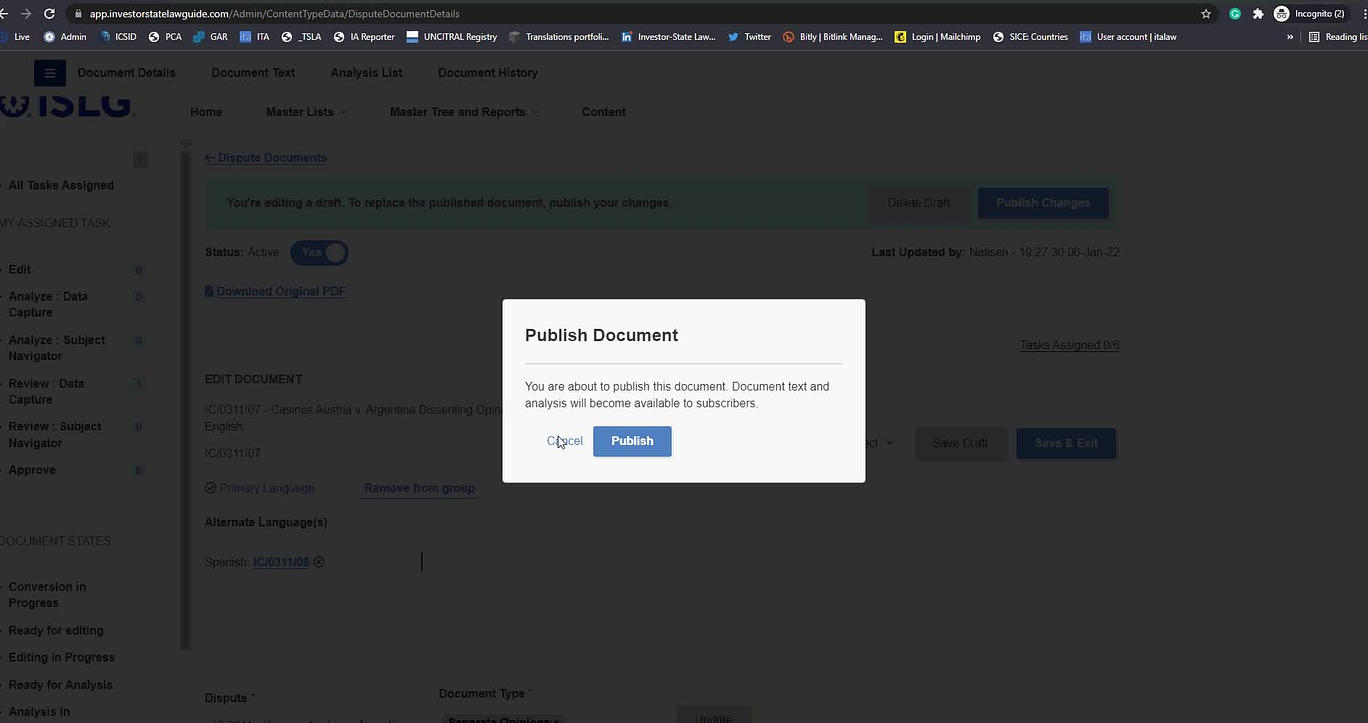
I am not sure what caused this as it was not the case before. This can wait, but I wanted to report this so the team knows.
Thanks,
Nafiseh
CC Paul
Paul
 Irit
Irit
I'd like to believe this is an isolated incident, but we'll see if
Thanks,
Paul
I am having this issue as well. Please note that when I open the Published version I see that my changes to the draft version are saved.
Irit
I have created a new item in the main backlog for this issue.
If you have bandwidth by next week, can you pull this item into the current sprint? If not, we will tackle it in the next sprint.
https://dev.azure.com/tologix/ISLGRebuild/_workitems/edit/1366
Thanks,
-Martin