













✔ Problem with copy/pasting text from PDF.js
Completed by Morgan M.
- Assigned to
-
 Anil V.
 Harsh P.
 Ryan K.
- Notes
-
Further to the video below (no audio), there is a problem with copy/pasting text from the PDF.js viewer. When text is pasted into a separate document it inserts random linebreaks throughout the text.
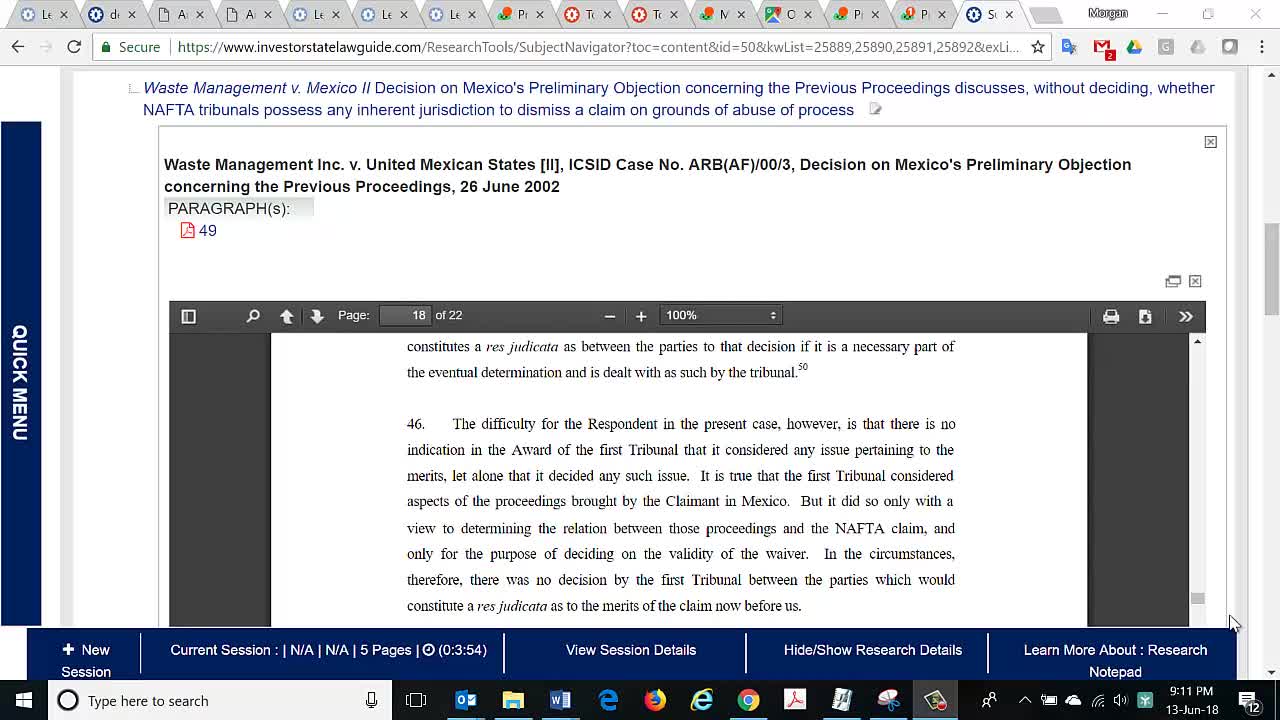
We are looking into this and will update you soon.
We are still doing R&D on this task and will update you soon. We are not sure right now but may be need to update the Pdf.js version.
Morgan
Could you provide an update on this to-do. We should ensure this is given a higher priority.
Thanks,
Morgan
We looked into this, the issue is because of the html structure generated by PDF.js it self. Changes are needed in PDF.js so that the generated html can have specific html tags.
We need to ask Contegra team if they can able to do this in PDF hit highlighter tool.
Please suggest.
OK. I'll reach out to Contegra to see if they have encountered the problem, and have a proposed solution. However, this may be an issue with PDF.js, which I understand is developed by Mozzilla.
Morgan
Further to the recommendation provided by Contegra, please implement the proposed solution to the printing problem, and then we'll continue to explore how to resolve the copy/paste issue.
Morgan
Morgan had suggested we open an issue for PDF.js on github related to the copy/paste issues. You would be able to explain the issue more technically than I would, so could one of you take care of this? Hopefully someone in the community can help us out.
https://github.com/mozilla/pdf.js/issues
Thanks!
Ryan
We have posted issue on github. Please review following URL to see the post.
https://github.com/mozilla/pdf.js/issues/10003
Let us know if you want to add/edit something.
Ryan
Morgan
Have you had a chance to review the other posts on this issue: https://github.com/mozilla/pdf.js/labels/4-text-selection? They may contain a possible solution to this problem.
Also, have we started working on the printing fix recommended by Contegra?
Thanks,
Morgan
Thanks for looping me into the email chain with Contegra. It appears we have the printing issue resolved and the copy/paste issue resolved exception of the line-breaks. However, is this solution only applicable to documents viewed in the the PDF highlighter through the Full Text Search, or does it apply to the PDF.js viewer across the entire system?
Thanks,
Morgan
Yes. We have resolved both printing and copy/paste issue exception of the line-breaks on both dev.islg and www.islg.
This solution is also applied to PDF.js viewer across the entire system on both dev.islg and www.islg.
I've performed some tests. The printing issues appears to be resolved; however, I'm still having some issues with copy/pasting where it is inserting addition spacing between words.
Thanks,
Morgan
We have tried to reproduce above issue by using example which you shown in video. But, It is working fine at our end.
We have also tried copy/paste different paragraphs with using different scenarios (e.g In PDF.js viewer, with new window in viewer, After downloaded PDF file). In All Scenarios it seems looks good.
Please note that we have checked copy/paste issue with Microsoft Word 2016.
Please see following word document for your reference
The sample you've provided has the issue I've pointed out above. I've attached is again, and underlined the sections where additional spaces have been inserted between words. This contrast the version from the Google Chrome PDF viewer. The PDF.js is better in some ways (e.g., there are no linebreaks at the end of each line); however, the additional space issue will cause large problems for users, because removing these spaces would be various tedious.
Thanks,
Morgan
Understood. Unfortunately, justified text is the standard format for legal documents, so this will occur very frequently across the document collection. I understand that this may be a fundamental flaw in PDF.js, but let's ensure we're exhausting every possible solution before we move on.
Thanks,
Morgan
Thanks for feedback.
The extra space issue between words might be occurred because of PDF content.
If you can try to copy/paste the paragraph by using following URL then you can see that extra spaces will be not inserted between words. (e.g copy/paste paragraph 4.873 or 4.874)
https://www.investorstatelawguide.com/ResearchTools/SubjectNavigator?toc=content&id=50&kwList=26140,26184,38605,52667,52169,52667&exList=&selectedNodeID=52667&search=&ci=52667&searchBranchLevel=#52667
For Google Chrome PDF Viewer issue, Could you please share a small video ? Because, When we tried copy/paste paragraph using Google Chrome PDF Viewer then it is working fine. We are not able too see any line breaks after each line.
When I copy paragraphs 4.873 & 4.874 in Chrome to Word I get the attached where it inserts many line breaks.
Please paste the paragraph by using "keep text only option" in word document and check once again.
As requested, the video below should hopefully clarify what the problem is with the spacing between words when copy/pasting justified text from within the PDF.js viewer. The example used in the video is here: https://www.investorstatelawguide.com/ResearchTools/SubjectNavigator?toc=content&id=50&kwList=26140,26184,38605,52169,52169&exList=&selectedNodeID=52169&search=&ci=52169&searchBranchLevel=#52169 and here is a sample of the work document created in the video:
Thanks,
Morgan
Thanks for sharing above video. It helped us to found the actual problem.
We are trying to find out the solution and also, I have sent mail to Radomir Mladenovic regarding above issues.
Hopefully a solution is on the horizon.
Thanks,
Morgan
Got your email about the latest fix on this issue. Although there is still an issue with the line break between each line of text, it is better than before, and consistent with other PDF viewers. Marking this to-do complete.
Thanks,
Morgan